> ## Documentation Index
> Fetch the complete documentation index at: https://docs-dev-chore-myaccount-api-autoupdate.mintlify.site/llms.txt
> Use this file to discover all available pages before exploring further.

> Learn how to configure an update policy form using Forms for Actions for users to review and accept new terms of service or consent updates.

# Use Cases: Configure an update policy form using Forms

<Card title="Before you start">
  1. Create a [Machine-to-Machine Application](/docs/get-started/auth0-overview/create-applications/machine-to-machine-apps) with the following scopes enabled:

  * `read:users`
  * `update:users`
  * `create:users`
  * `read:users_app_metadata`
  * `update:users_app_metadata`
  * `create:users_app_metadata`

  2. Add a [Vault connection](/docs/customize/forms/vault) using the M2M application credentials.
</Card>

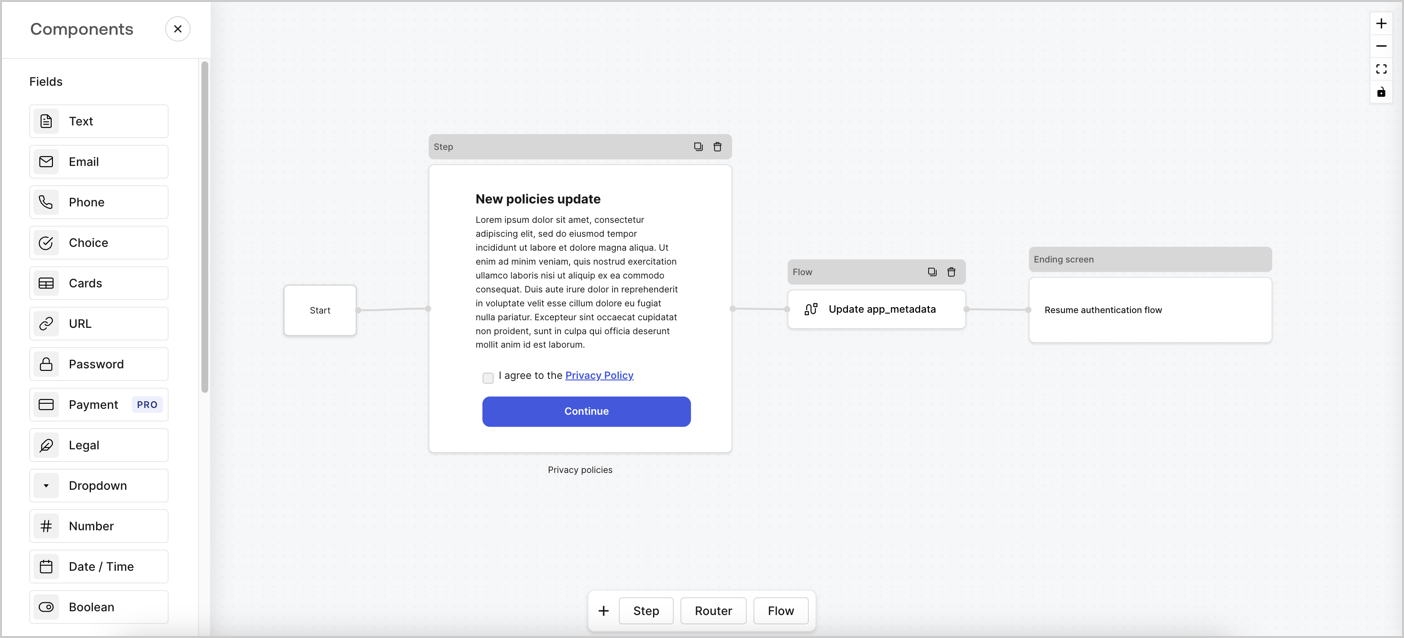
Forms for Actions allows you to create custom privacy policies flows and store the consent under the `app_metadata` object.
<Frame>
  <img src="https://mintcdn.com/docs-dev-chore-myaccount-api-autoupdate/TwrLWOmtEE_zyIZg/docs/images/cdy7uua7fh8z/6i68dMvHDTijfRmSgN1x8Q/ad900e7d4c0fb34645921435472b8684/privavy-policy-form.png?fit=max&auto=format&n=TwrLWOmtEE_zyIZg&q=85&s=2b7ef58ef01293e830d28a31a49b6364" alt="Dashboard > Actions > Forms > Privacy policy use case" data-og-width="1404" width="1404" data-og-height="638" height="638" data-path="docs/images/cdy7uua7fh8z/6i68dMvHDTijfRmSgN1x8Q/ad900e7d4c0fb34645921435472b8684/privavy-policy-form.png" data-optimize="true" data-opv="3" srcset="https://mintcdn.com/docs-dev-chore-myaccount-api-autoupdate/TwrLWOmtEE_zyIZg/docs/images/cdy7uua7fh8z/6i68dMvHDTijfRmSgN1x8Q/ad900e7d4c0fb34645921435472b8684/privavy-policy-form.png?w=280&fit=max&auto=format&n=TwrLWOmtEE_zyIZg&q=85&s=08f231086959d39d319834ac290952f4 280w, https://mintcdn.com/docs-dev-chore-myaccount-api-autoupdate/TwrLWOmtEE_zyIZg/docs/images/cdy7uua7fh8z/6i68dMvHDTijfRmSgN1x8Q/ad900e7d4c0fb34645921435472b8684/privavy-policy-form.png?w=560&fit=max&auto=format&n=TwrLWOmtEE_zyIZg&q=85&s=a6426defc6efbd50adee34849ceba458 560w, https://mintcdn.com/docs-dev-chore-myaccount-api-autoupdate/TwrLWOmtEE_zyIZg/docs/images/cdy7uua7fh8z/6i68dMvHDTijfRmSgN1x8Q/ad900e7d4c0fb34645921435472b8684/privavy-policy-form.png?w=840&fit=max&auto=format&n=TwrLWOmtEE_zyIZg&q=85&s=8ded2920dbd42bdd37507255622bc2f3 840w, https://mintcdn.com/docs-dev-chore-myaccount-api-autoupdate/TwrLWOmtEE_zyIZg/docs/images/cdy7uua7fh8z/6i68dMvHDTijfRmSgN1x8Q/ad900e7d4c0fb34645921435472b8684/privavy-policy-form.png?w=1100&fit=max&auto=format&n=TwrLWOmtEE_zyIZg&q=85&s=7dd7cec0cdee8a71436543906e4657b7 1100w, https://mintcdn.com/docs-dev-chore-myaccount-api-autoupdate/TwrLWOmtEE_zyIZg/docs/images/cdy7uua7fh8z/6i68dMvHDTijfRmSgN1x8Q/ad900e7d4c0fb34645921435472b8684/privavy-policy-form.png?w=1650&fit=max&auto=format&n=TwrLWOmtEE_zyIZg&q=85&s=8aa8beb51d0927dfb97ffdf72f74603e 1650w, https://mintcdn.com/docs-dev-chore-myaccount-api-autoupdate/TwrLWOmtEE_zyIZg/docs/images/cdy7uua7fh8z/6i68dMvHDTijfRmSgN1x8Q/ad900e7d4c0fb34645921435472b8684/privavy-policy-form.png?w=2500&fit=max&auto=format&n=TwrLWOmtEE_zyIZg&q=85&s=838260ac8ac945cbf2addbda5c91905e 2500w" />
</Frame>

The sections below outline how you can create an Update Policy form using nodes and flows, along with steps for adding your form to a [Post Login](/docs/customize/actions/explore-triggers/signup-and-login-triggers/login-trigger) Action.

## Create a form from scratch

Follow these steps to create a form to gather information:

1. Open the Form editor by selecting **Auth0 Dashboard > Actions > Forms.**
2. Select **Create Form** > **Start from scratch**.

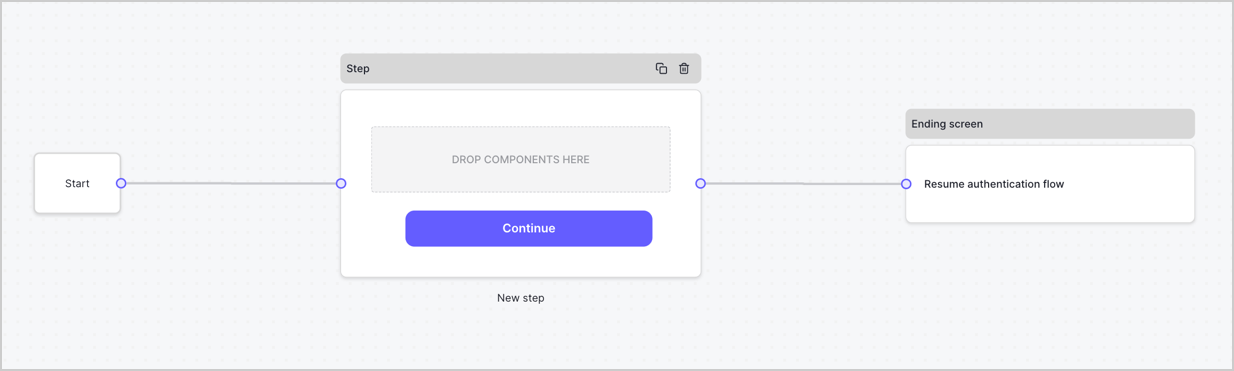
By default, a new form contains a Start node, a Step node, and an Ending screen node.
<Frame>
  <img src="https://mintcdn.com/docs-dev-chore-myaccount-api-autoupdate/xjbLFTbb3mNkqhP2/docs/images/cdy7uua7fh8z/2TZ9jSjgEcARFpULI6hz4R/a4319a1bd482f2ee5cc23100fdb2f42c/New-form-Forms-for-action-use-case.png?fit=max&auto=format&n=xjbLFTbb3mNkqhP2&q=85&s=626e8e4b4a558105ec3bc1d9728ad506" alt="Dashboard > Forms > Use Cases > Form" data-og-width="1234" width="1234" data-og-height="371" height="371" data-path="docs/images/cdy7uua7fh8z/2TZ9jSjgEcARFpULI6hz4R/a4319a1bd482f2ee5cc23100fdb2f42c/New-form-Forms-for-action-use-case.png" data-optimize="true" data-opv="3" srcset="https://mintcdn.com/docs-dev-chore-myaccount-api-autoupdate/xjbLFTbb3mNkqhP2/docs/images/cdy7uua7fh8z/2TZ9jSjgEcARFpULI6hz4R/a4319a1bd482f2ee5cc23100fdb2f42c/New-form-Forms-for-action-use-case.png?w=280&fit=max&auto=format&n=xjbLFTbb3mNkqhP2&q=85&s=bed0c3ac0b9a2bba9a7fa4263582c4d6 280w, https://mintcdn.com/docs-dev-chore-myaccount-api-autoupdate/xjbLFTbb3mNkqhP2/docs/images/cdy7uua7fh8z/2TZ9jSjgEcARFpULI6hz4R/a4319a1bd482f2ee5cc23100fdb2f42c/New-form-Forms-for-action-use-case.png?w=560&fit=max&auto=format&n=xjbLFTbb3mNkqhP2&q=85&s=437ae6cd8819a989ae0aa8a9e722360e 560w, https://mintcdn.com/docs-dev-chore-myaccount-api-autoupdate/xjbLFTbb3mNkqhP2/docs/images/cdy7uua7fh8z/2TZ9jSjgEcARFpULI6hz4R/a4319a1bd482f2ee5cc23100fdb2f42c/New-form-Forms-for-action-use-case.png?w=840&fit=max&auto=format&n=xjbLFTbb3mNkqhP2&q=85&s=86abeb65a6d975f3c9608d3332b02e33 840w, https://mintcdn.com/docs-dev-chore-myaccount-api-autoupdate/xjbLFTbb3mNkqhP2/docs/images/cdy7uua7fh8z/2TZ9jSjgEcARFpULI6hz4R/a4319a1bd482f2ee5cc23100fdb2f42c/New-form-Forms-for-action-use-case.png?w=1100&fit=max&auto=format&n=xjbLFTbb3mNkqhP2&q=85&s=5f121720a4068308e4d65caef9cd8a8d 1100w, https://mintcdn.com/docs-dev-chore-myaccount-api-autoupdate/xjbLFTbb3mNkqhP2/docs/images/cdy7uua7fh8z/2TZ9jSjgEcARFpULI6hz4R/a4319a1bd482f2ee5cc23100fdb2f42c/New-form-Forms-for-action-use-case.png?w=1650&fit=max&auto=format&n=xjbLFTbb3mNkqhP2&q=85&s=455f12f3596ed4f0aee4dc81955a8b9a 1650w, https://mintcdn.com/docs-dev-chore-myaccount-api-autoupdate/xjbLFTbb3mNkqhP2/docs/images/cdy7uua7fh8z/2TZ9jSjgEcARFpULI6hz4R/a4319a1bd482f2ee5cc23100fdb2f42c/New-form-Forms-for-action-use-case.png?w=2500&fit=max&auto=format&n=xjbLFTbb3mNkqhP2&q=85&s=90874a428dada9f35e827291a078a4a6 2500w" />
</Frame>

### Configure the Step node

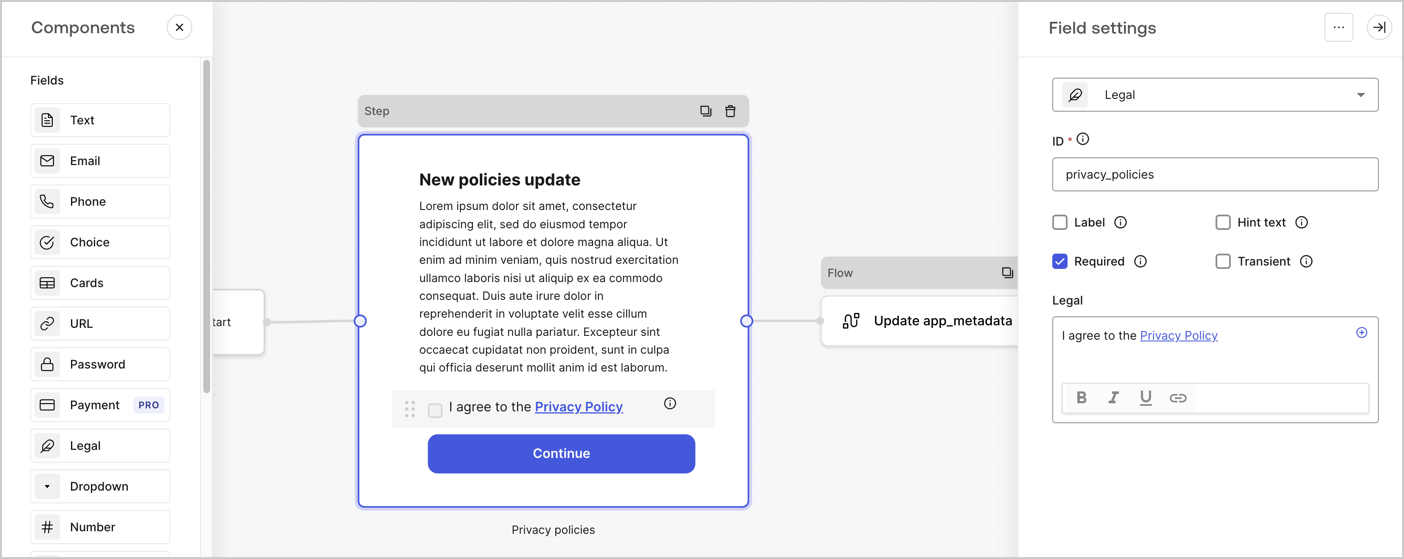
The Step node is the graphical interface visible to users. Add [Fields](/docs/customize/forms/nodes-and-components) to the Step node to collect the new agreement acceptance value by following these steps:

1. Drag a **Rich text** field from the **Components menu** into the **Step** node.

   * **Rich text**: Enter a description of your privacy policies updates.
   * Select **Save**.
2. Drag a **Legal** field into the **Step** node.

   * **ID**: Enter `privacy_policies`.
   * **Required**: Enable the checkbox.
   * **Legal**: Enter `I agree to the Privacy Policy`.
   * Select **Save**.
3. Select **Publish** to save.
<Frame>
  <img src="https://mintcdn.com/docs-dev-chore-myaccount-api-autoupdate/yeB-_kMT57yxnTpV/docs/images/cdy7uua7fh8z/59zFFjQjAnjogkc2QGIqqJ/0ad66b1b636544122aa4e65968b76c2c/privacy-policy-step-node.png?fit=max&auto=format&n=yeB-_kMT57yxnTpV&q=85&s=f103bf22bf111cfec6a269428890945b" alt="Dashboard > Actions > Forms > Use case privacy policy step node" data-og-width="1404" width="1404" data-og-height="559" height="559" data-path="docs/images/cdy7uua7fh8z/59zFFjQjAnjogkc2QGIqqJ/0ad66b1b636544122aa4e65968b76c2c/privacy-policy-step-node.png" data-optimize="true" data-opv="3" srcset="https://mintcdn.com/docs-dev-chore-myaccount-api-autoupdate/yeB-_kMT57yxnTpV/docs/images/cdy7uua7fh8z/59zFFjQjAnjogkc2QGIqqJ/0ad66b1b636544122aa4e65968b76c2c/privacy-policy-step-node.png?w=280&fit=max&auto=format&n=yeB-_kMT57yxnTpV&q=85&s=6df2360cf903db0389ea1be28f532cdc 280w, https://mintcdn.com/docs-dev-chore-myaccount-api-autoupdate/yeB-_kMT57yxnTpV/docs/images/cdy7uua7fh8z/59zFFjQjAnjogkc2QGIqqJ/0ad66b1b636544122aa4e65968b76c2c/privacy-policy-step-node.png?w=560&fit=max&auto=format&n=yeB-_kMT57yxnTpV&q=85&s=2170cb6cf181da80b96c892c5bb68d4b 560w, https://mintcdn.com/docs-dev-chore-myaccount-api-autoupdate/yeB-_kMT57yxnTpV/docs/images/cdy7uua7fh8z/59zFFjQjAnjogkc2QGIqqJ/0ad66b1b636544122aa4e65968b76c2c/privacy-policy-step-node.png?w=840&fit=max&auto=format&n=yeB-_kMT57yxnTpV&q=85&s=012e86fc2787c4f7f5a6caae3b7dafdf 840w, https://mintcdn.com/docs-dev-chore-myaccount-api-autoupdate/yeB-_kMT57yxnTpV/docs/images/cdy7uua7fh8z/59zFFjQjAnjogkc2QGIqqJ/0ad66b1b636544122aa4e65968b76c2c/privacy-policy-step-node.png?w=1100&fit=max&auto=format&n=yeB-_kMT57yxnTpV&q=85&s=657af9601411e4c18763b52fb4c5c20f 1100w, https://mintcdn.com/docs-dev-chore-myaccount-api-autoupdate/yeB-_kMT57yxnTpV/docs/images/cdy7uua7fh8z/59zFFjQjAnjogkc2QGIqqJ/0ad66b1b636544122aa4e65968b76c2c/privacy-policy-step-node.png?w=1650&fit=max&auto=format&n=yeB-_kMT57yxnTpV&q=85&s=36810e6de566ef1a8cf8abf922722b5f 1650w, https://mintcdn.com/docs-dev-chore-myaccount-api-autoupdate/yeB-_kMT57yxnTpV/docs/images/cdy7uua7fh8z/59zFFjQjAnjogkc2QGIqqJ/0ad66b1b636544122aa4e65968b76c2c/privacy-policy-step-node.png?w=2500&fit=max&auto=format&n=yeB-_kMT57yxnTpV&q=85&s=0db9dbe65784661ae3bdede4fb0c5950 2500w" />
</Frame>

### Configure the Flow node

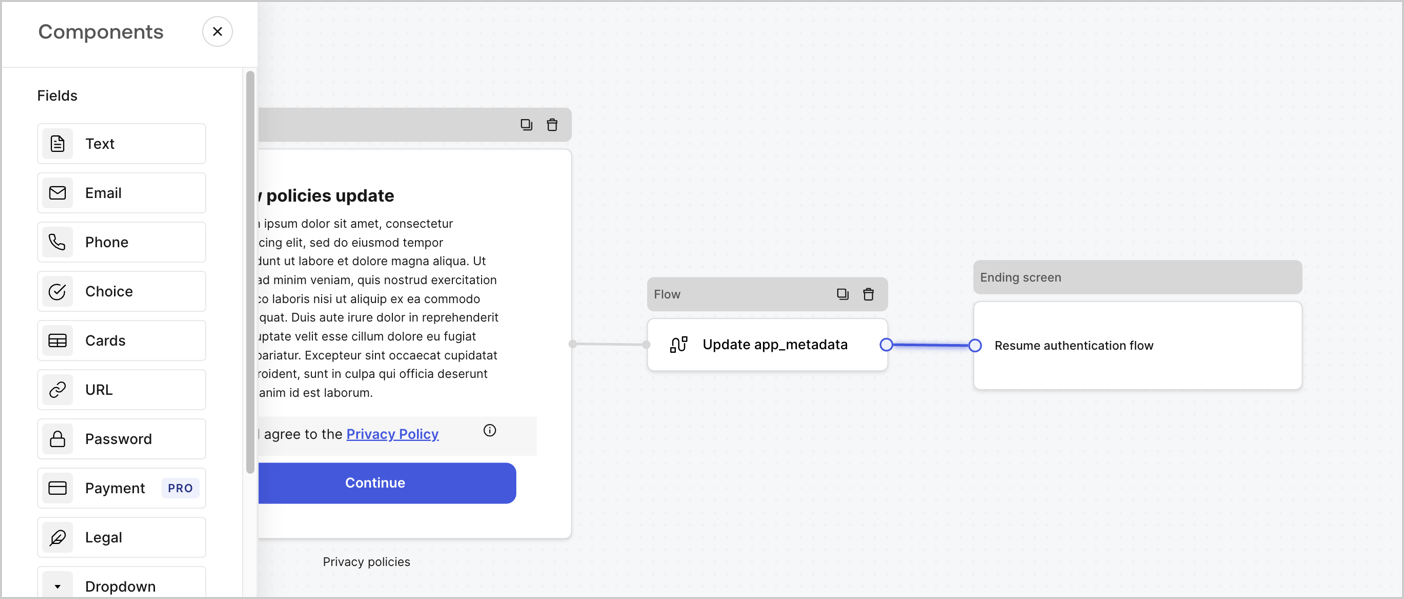
Add a **Flow** node after the **Step** node to update the `app_metadata` and resume the authentication flow by following these steps:

1. Select **Flow** from the bottom of the Form editor.
2. Remove the existing link between the **Step** and **Ending Screen** nodes.
3. Select the new **Flow** > **Click to add a flow** > **Create a new flow.**

   * Enter `Update app_metadata` in the **Name** field.
   * Select **Create**.
   * Select **Save**.
4. Link the **Flow** node to the **Step** and **Ending Screen** nodes as pictured below.
5. Select **Publish** to save.
<Frame>
  <img src="https://mintcdn.com/docs-dev-chore-myaccount-api-autoupdate/TwrLWOmtEE_zyIZg/docs/images/cdy7uua7fh8z/6YIkzm7SrpM9LW76AXuRzh/353c518fe82bbaa440836da1d83596d6/link-policies.png?fit=max&auto=format&n=TwrLWOmtEE_zyIZg&q=85&s=3d6a47f2cc06ef4a1de85a8f34f46814" alt="Dashboard > Actions > Forms > Form" data-og-width="1404" width="1404" data-og-height="599" height="599" data-path="docs/images/cdy7uua7fh8z/6YIkzm7SrpM9LW76AXuRzh/353c518fe82bbaa440836da1d83596d6/link-policies.png" data-optimize="true" data-opv="3" srcset="https://mintcdn.com/docs-dev-chore-myaccount-api-autoupdate/TwrLWOmtEE_zyIZg/docs/images/cdy7uua7fh8z/6YIkzm7SrpM9LW76AXuRzh/353c518fe82bbaa440836da1d83596d6/link-policies.png?w=280&fit=max&auto=format&n=TwrLWOmtEE_zyIZg&q=85&s=4418df3e0b183e812e9691df15f5d60f 280w, https://mintcdn.com/docs-dev-chore-myaccount-api-autoupdate/TwrLWOmtEE_zyIZg/docs/images/cdy7uua7fh8z/6YIkzm7SrpM9LW76AXuRzh/353c518fe82bbaa440836da1d83596d6/link-policies.png?w=560&fit=max&auto=format&n=TwrLWOmtEE_zyIZg&q=85&s=5e5909c3442ba54ba16b7d44beee66ce 560w, https://mintcdn.com/docs-dev-chore-myaccount-api-autoupdate/TwrLWOmtEE_zyIZg/docs/images/cdy7uua7fh8z/6YIkzm7SrpM9LW76AXuRzh/353c518fe82bbaa440836da1d83596d6/link-policies.png?w=840&fit=max&auto=format&n=TwrLWOmtEE_zyIZg&q=85&s=41e66bb767e742708cb1b4ef7b41cb30 840w, https://mintcdn.com/docs-dev-chore-myaccount-api-autoupdate/TwrLWOmtEE_zyIZg/docs/images/cdy7uua7fh8z/6YIkzm7SrpM9LW76AXuRzh/353c518fe82bbaa440836da1d83596d6/link-policies.png?w=1100&fit=max&auto=format&n=TwrLWOmtEE_zyIZg&q=85&s=580328323edaaa78e64d1a46c318cc96 1100w, https://mintcdn.com/docs-dev-chore-myaccount-api-autoupdate/TwrLWOmtEE_zyIZg/docs/images/cdy7uua7fh8z/6YIkzm7SrpM9LW76AXuRzh/353c518fe82bbaa440836da1d83596d6/link-policies.png?w=1650&fit=max&auto=format&n=TwrLWOmtEE_zyIZg&q=85&s=ddc71a586c505fbdc624097af575b651 1650w, https://mintcdn.com/docs-dev-chore-myaccount-api-autoupdate/TwrLWOmtEE_zyIZg/docs/images/cdy7uua7fh8z/6YIkzm7SrpM9LW76AXuRzh/353c518fe82bbaa440836da1d83596d6/link-policies.png?w=2500&fit=max&auto=format&n=TwrLWOmtEE_zyIZg&q=85&s=ab75a68d83e59977f27430951b7451c4 2500w" />
</Frame>

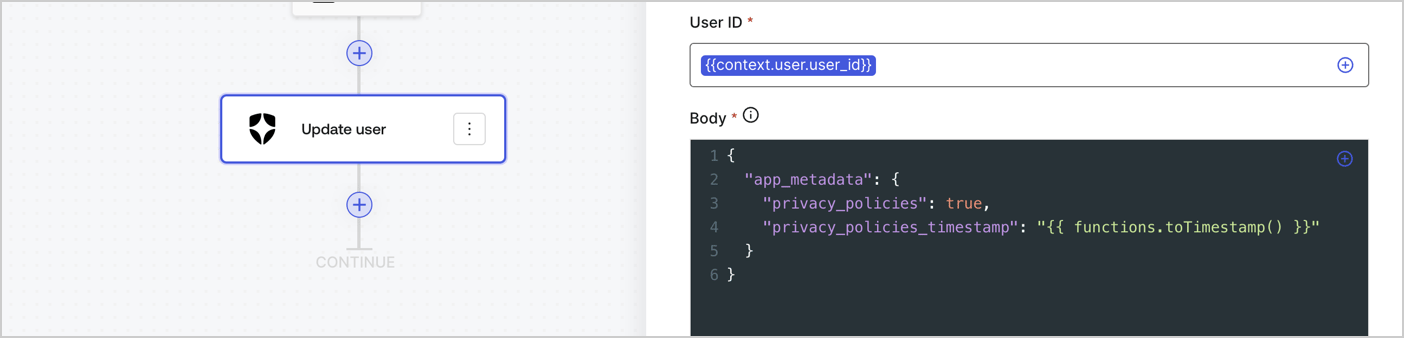
Add an Auth0 Update user action to the flow by following these steps:

1. Select the **Flow** **Update app\_metadata** > **Edit flow** to open the Flow editor in a new tab.
2. Below the StartAction, select the **+** icon to add an **Update user** action. Complete the fields below, then select **Save** to continue.

   * **Connection**: Select from the dropdown the Vault connection to your M2M application.

   * **User ID**: Enter `{{context.user.user_id}}`.

   * **Body**: Copy and paste the following code to update the app\_metadata with the privacy\_policies and privacy\_policies\_timestamp properties.

     ```text lines theme={null}
     {
       "app_metadata": {
         "privacy_policies": true,
         "privacy_policies_timestamp": "{{ functions.toTimestamp() }}"
       }
     }
     ```

   * Select **Save**.
3. Select **Publish** to save.
<Frame>
  <img src="https://mintcdn.com/docs-dev-chore-myaccount-api-autoupdate/0pc0J-xi5wIlMd5V/docs/images/cdy7uua7fh8z/CvMNIwWrOUwaFW4X3G28p/1fb70ae57a20749d9ffaaba8dc0b7e26/update-user-privacy.png?fit=max&auto=format&n=0pc0J-xi5wIlMd5V&q=85&s=518b06db769f31f362864c94065c37a5" alt="Dashboard > Actions > Forms > User case privacy policy code" data-og-width="1404" width="1404" data-og-height="338" height="338" data-path="docs/images/cdy7uua7fh8z/CvMNIwWrOUwaFW4X3G28p/1fb70ae57a20749d9ffaaba8dc0b7e26/update-user-privacy.png" data-optimize="true" data-opv="3" srcset="https://mintcdn.com/docs-dev-chore-myaccount-api-autoupdate/0pc0J-xi5wIlMd5V/docs/images/cdy7uua7fh8z/CvMNIwWrOUwaFW4X3G28p/1fb70ae57a20749d9ffaaba8dc0b7e26/update-user-privacy.png?w=280&fit=max&auto=format&n=0pc0J-xi5wIlMd5V&q=85&s=a0ffbaae90e7930c64002a9d5c9d46c3 280w, https://mintcdn.com/docs-dev-chore-myaccount-api-autoupdate/0pc0J-xi5wIlMd5V/docs/images/cdy7uua7fh8z/CvMNIwWrOUwaFW4X3G28p/1fb70ae57a20749d9ffaaba8dc0b7e26/update-user-privacy.png?w=560&fit=max&auto=format&n=0pc0J-xi5wIlMd5V&q=85&s=9e876b51167d83ff1355f64afb02d8d6 560w, https://mintcdn.com/docs-dev-chore-myaccount-api-autoupdate/0pc0J-xi5wIlMd5V/docs/images/cdy7uua7fh8z/CvMNIwWrOUwaFW4X3G28p/1fb70ae57a20749d9ffaaba8dc0b7e26/update-user-privacy.png?w=840&fit=max&auto=format&n=0pc0J-xi5wIlMd5V&q=85&s=41a71810a655a2f8855e533b28f8a89c 840w, https://mintcdn.com/docs-dev-chore-myaccount-api-autoupdate/0pc0J-xi5wIlMd5V/docs/images/cdy7uua7fh8z/CvMNIwWrOUwaFW4X3G28p/1fb70ae57a20749d9ffaaba8dc0b7e26/update-user-privacy.png?w=1100&fit=max&auto=format&n=0pc0J-xi5wIlMd5V&q=85&s=0b90083c02dd35a1fd6cbd94991422df 1100w, https://mintcdn.com/docs-dev-chore-myaccount-api-autoupdate/0pc0J-xi5wIlMd5V/docs/images/cdy7uua7fh8z/CvMNIwWrOUwaFW4X3G28p/1fb70ae57a20749d9ffaaba8dc0b7e26/update-user-privacy.png?w=1650&fit=max&auto=format&n=0pc0J-xi5wIlMd5V&q=85&s=17270558ace45087d3b6bc37987dd8b2 1650w, https://mintcdn.com/docs-dev-chore-myaccount-api-autoupdate/0pc0J-xi5wIlMd5V/docs/images/cdy7uua7fh8z/CvMNIwWrOUwaFW4X3G28p/1fb70ae57a20749d9ffaaba8dc0b7e26/update-user-privacy.png?w=2500&fit=max&auto=format&n=0pc0J-xi5wIlMd5V&q=85&s=40881d1d92158d6a0cc0d3d78dceeb89 2500w" />
</Frame>

<Callout icon="file-lines" color="#0EA5E9" iconType="regular">
  The flow **Update app\_metadata** adds a `privacy_policies true` value to the app`_metadata` object and also generates a timestamp with a [helper function.](/docs/customize/forms/variables)
</Callout>

## Retrieve the form render code

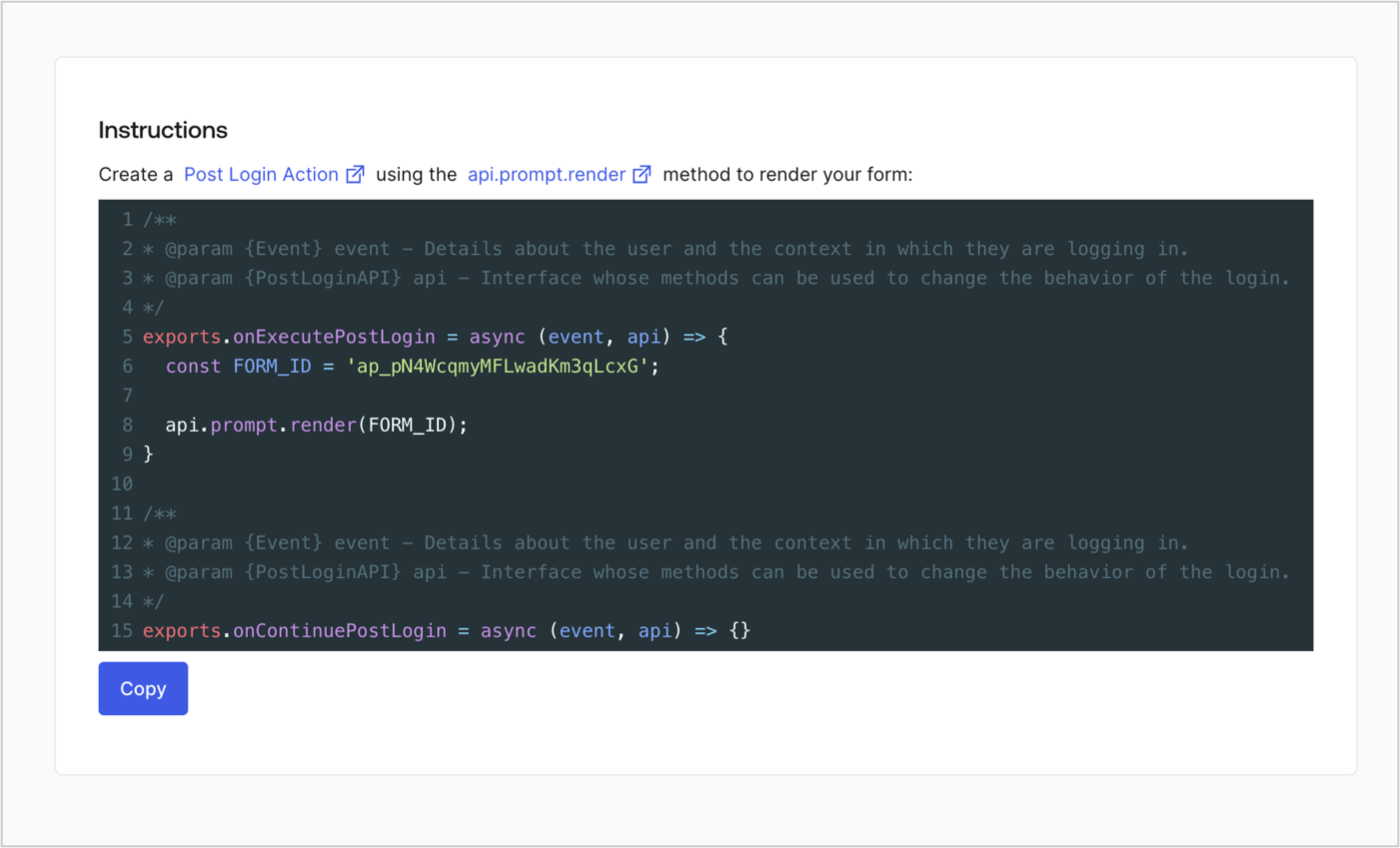
Retrieve your form render code to visually render the form with a custom Post Login Action by following these steps:

* From the Form editor, select **`<> Render`**.
* Select **Copy**.
<Frame>
  <img src="https://mintcdn.com/docs-dev-chore-myaccount-api-autoupdate/8QDqDsYoCi_WTBFO/docs/images/cdy7uua7fh8z/2EIUzc539sq9lwoTKbjoJv/496a864c0fc44a782c9cadca119dbfb0/embed.png?fit=max&auto=format&n=8QDqDsYoCi_WTBFO&q=85&s=741bd11e736604e33d0fb1a59ed78dfe" alt="Dashboard > Actions > Forms > Form > Embed" data-og-width="1400" width="1400" data-og-height="848" height="848" data-path="docs/images/cdy7uua7fh8z/2EIUzc539sq9lwoTKbjoJv/496a864c0fc44a782c9cadca119dbfb0/embed.png" data-optimize="true" data-opv="3" srcset="https://mintcdn.com/docs-dev-chore-myaccount-api-autoupdate/8QDqDsYoCi_WTBFO/docs/images/cdy7uua7fh8z/2EIUzc539sq9lwoTKbjoJv/496a864c0fc44a782c9cadca119dbfb0/embed.png?w=280&fit=max&auto=format&n=8QDqDsYoCi_WTBFO&q=85&s=c48e68074ebe20efb4ce43cc8a3cc182 280w, https://mintcdn.com/docs-dev-chore-myaccount-api-autoupdate/8QDqDsYoCi_WTBFO/docs/images/cdy7uua7fh8z/2EIUzc539sq9lwoTKbjoJv/496a864c0fc44a782c9cadca119dbfb0/embed.png?w=560&fit=max&auto=format&n=8QDqDsYoCi_WTBFO&q=85&s=6a89ef932ef9f113ab5c2303cf5db408 560w, https://mintcdn.com/docs-dev-chore-myaccount-api-autoupdate/8QDqDsYoCi_WTBFO/docs/images/cdy7uua7fh8z/2EIUzc539sq9lwoTKbjoJv/496a864c0fc44a782c9cadca119dbfb0/embed.png?w=840&fit=max&auto=format&n=8QDqDsYoCi_WTBFO&q=85&s=90d6001f103f89f2e67cd24624b6da8d 840w, https://mintcdn.com/docs-dev-chore-myaccount-api-autoupdate/8QDqDsYoCi_WTBFO/docs/images/cdy7uua7fh8z/2EIUzc539sq9lwoTKbjoJv/496a864c0fc44a782c9cadca119dbfb0/embed.png?w=1100&fit=max&auto=format&n=8QDqDsYoCi_WTBFO&q=85&s=ad7ba4837d0eb9ed48910c7d4a32c2aa 1100w, https://mintcdn.com/docs-dev-chore-myaccount-api-autoupdate/8QDqDsYoCi_WTBFO/docs/images/cdy7uua7fh8z/2EIUzc539sq9lwoTKbjoJv/496a864c0fc44a782c9cadca119dbfb0/embed.png?w=1650&fit=max&auto=format&n=8QDqDsYoCi_WTBFO&q=85&s=43015aed00e4bd000b426e5b7bca1c63 1650w, https://mintcdn.com/docs-dev-chore-myaccount-api-autoupdate/8QDqDsYoCi_WTBFO/docs/images/cdy7uua7fh8z/2EIUzc539sq9lwoTKbjoJv/496a864c0fc44a782c9cadca119dbfb0/embed.png?w=2500&fit=max&auto=format&n=8QDqDsYoCi_WTBFO&q=85&s=3c99152e4672f4e458cf5d22ba3bbc81 2500w" />
</Frame>

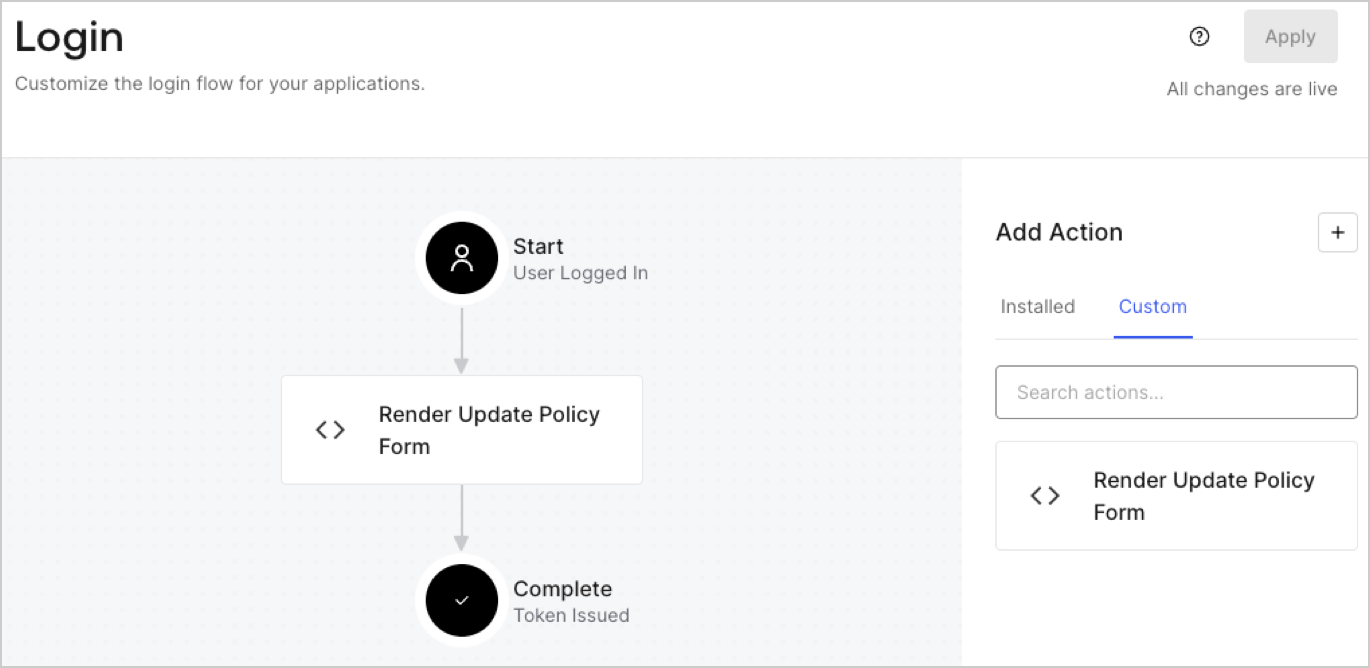
## Create a Post Login Action

Create a post-login Action to render your form by following these steps:

1. Navigate to **Auth0 Dashboard > Actions > Flows > Login.**
2. Select the **+** icon and Select **Build from scratch**:

   * **Name**: Enter `Render Update Policy Form`.
   * **Trigger**: Select `Login / Post Login`.
   * **Runtime**: Select the recommended version.
3. Select **Create**.

To configure the post-login Action:

1. Delete the existing code from the Code editor.
2. Paste the form render code into the Code editor.
3. Edit the code to define the conditional logic that will render the form.

   ```javascript lines theme={null}
   /**
   * @param {Event} event - Details about the user and the context in which they are logging in.
   * @param {PostLoginAPI} api - Interface whose methods can be used to change the behavior of the login.
   */
   exports.onExecutePostLogin = async (event, api) => {
     const FORM_ID = 'REPLACE_WITH_YOUR_FORM_ID';

     if (event.user.app_metadata.privacy_policies !== true) {
       api.prompt.render(FORM_ID);
     }
   }

   exports.onContinuePostLogin = async (event, api) => { }
   ```

   <Callout icon="file-lines" color="#0EA5E9" iconType="regular">
     The example code above will render the form when a user is missing the app metadata `privacy_policies` property.
   </Callout>
4. Select **Deploy.**
5. Drag and Drop the **Render Update Policy Form** Action to the **Login** flow.
   <Frame>
     <img src="https://mintcdn.com/docs-dev-chore-myaccount-api-autoupdate/92Wt_74aRs6J5W5X/docs/images/cdy7uua7fh8z/5TOwDgevZsBqd7yZynUYWU/41ca909dc3007aed4f40ff794a05efa5/postlogin.png?fit=max&auto=format&n=92Wt_74aRs6J5W5X&q=85&s=9f55cab43a942b4eb651b7c05a84e244" alt="Dashboard > Forms > Use Case > Render update policy form login action" data-og-width="1370" width="1370" data-og-height="668" height="668" data-path="docs/images/cdy7uua7fh8z/5TOwDgevZsBqd7yZynUYWU/41ca909dc3007aed4f40ff794a05efa5/postlogin.png" data-optimize="true" data-opv="3" srcset="https://mintcdn.com/docs-dev-chore-myaccount-api-autoupdate/92Wt_74aRs6J5W5X/docs/images/cdy7uua7fh8z/5TOwDgevZsBqd7yZynUYWU/41ca909dc3007aed4f40ff794a05efa5/postlogin.png?w=280&fit=max&auto=format&n=92Wt_74aRs6J5W5X&q=85&s=48567552e117be67fc268be33601d009 280w, https://mintcdn.com/docs-dev-chore-myaccount-api-autoupdate/92Wt_74aRs6J5W5X/docs/images/cdy7uua7fh8z/5TOwDgevZsBqd7yZynUYWU/41ca909dc3007aed4f40ff794a05efa5/postlogin.png?w=560&fit=max&auto=format&n=92Wt_74aRs6J5W5X&q=85&s=625c509f789d7ead7b3e08742e78305f 560w, https://mintcdn.com/docs-dev-chore-myaccount-api-autoupdate/92Wt_74aRs6J5W5X/docs/images/cdy7uua7fh8z/5TOwDgevZsBqd7yZynUYWU/41ca909dc3007aed4f40ff794a05efa5/postlogin.png?w=840&fit=max&auto=format&n=92Wt_74aRs6J5W5X&q=85&s=7fde760bab88d22aaecf43ce5009d9cc 840w, https://mintcdn.com/docs-dev-chore-myaccount-api-autoupdate/92Wt_74aRs6J5W5X/docs/images/cdy7uua7fh8z/5TOwDgevZsBqd7yZynUYWU/41ca909dc3007aed4f40ff794a05efa5/postlogin.png?w=1100&fit=max&auto=format&n=92Wt_74aRs6J5W5X&q=85&s=f1d591bf771a06dc041fc4891861a515 1100w, https://mintcdn.com/docs-dev-chore-myaccount-api-autoupdate/92Wt_74aRs6J5W5X/docs/images/cdy7uua7fh8z/5TOwDgevZsBqd7yZynUYWU/41ca909dc3007aed4f40ff794a05efa5/postlogin.png?w=1650&fit=max&auto=format&n=92Wt_74aRs6J5W5X&q=85&s=b78caf56091e43e9dac24f2de8074d08 1650w, https://mintcdn.com/docs-dev-chore-myaccount-api-autoupdate/92Wt_74aRs6J5W5X/docs/images/cdy7uua7fh8z/5TOwDgevZsBqd7yZynUYWU/41ca909dc3007aed4f40ff794a05efa5/postlogin.png?w=2500&fit=max&auto=format&n=92Wt_74aRs6J5W5X&q=85&s=e3b9771be8b98ce89dc8e4bdfc9b01b5 2500w" />
   </Frame>
6. Select **Apply.**

### Test implementation

Test the implementation by following these steps:

1. Log in with an existing user whose app`_metadata` attribute `privacy_policies` does not have a value.
2. The post-login Action in the Login flow will render the form and prompt for acceptance.
3. Select **Auth0 Dashboard > User Management > Users,** locate the user and verify that the `app_metadata` attribute `privacy_policies` contains a `true` value and a timestamp.
