> ## Documentation Index
> Fetch the complete documentation index at: https://docs-dev-chore-myaccount-api-autoupdate.mintlify.site/llms.txt
> Use this file to discover all available pages before exploring further.

> Découvrez comment utiliser les variables pour accéder aux données utilisateur et les transformer dans Forms et Flows.

# Variables et fonctions utilitaires

Les variables vous permettent d’accéder aux données contenues dans Forms et Flows pour créer une logique métier personnalisée et des automatisations.

Voici quelques points de base à retenir sur l’utilisation des variables :

* Les variables sont entourées d’accolades `{{ variable }}`.
* Si une variable n’existe pas ou ne peut pas être résolue, elle a le même effet qu’une variable `undefined`.
* Vous pouvez utiliser l’opérateur de coalescence des valeurs nulles pour gérer les variables `null` ou `undefined`, par exemple :`{{fields.foo ?? fields.bar}}`.

<h2 id="available-variables">
  Variables disponibles
</h2>

Vous pouvez utiliser différents types de variables pour référencer et transformer les données que vous recueillez auprès de vos clients avec Forms et Flows.

| Variable                   | Syntaxe           | Où            | Description                                                                   |
| -------------------------- | ----------------- | ------------- | ----------------------------------------------------------------------------- |
| Contexte                   | `{{context.*}}`   | Forms / Flows | Référence les données de contexte de la transaction en cours                  |
| Champs de formulaire       | `{{fields.*}}`    | Forms / Flows | Référence les données de vos champs de formulaire et de vos champs masqués    |
| Variables partagées        | `{{vars.*}}`      | Forms / Flows | Référence les données stockées dans des variables partagées                   |
| Sortie des actions de Flow | `{{actions.*}}`   | Flows         | Référence les données de la réponse de sortie des actions de Flow précédentes |
| Fonctions utilitaires      | `{{functions.*}}` | Forms / Flows | Fonctions utilitaires pour transformer les données                            |

<h3 id="context-variables">
  Variables de contexte
</h3>

Forms et les flows héritent automatiquement des variables de contexte de la transaction en cours. Vous pouvez accéder aux variables de contexte suivantes :

* L’objet `user`, avec accès aux propriétés suivantes :

  * `user.user_id`
  * `user.username`
  * `user.name`
  * `user.given_name`
  * `user.family_name`
  * `user.nickname`
  * `user.email`
  * `user.email_verified`
  * `user.phone_number`
  * `user.phone_verified`
  * `user.picture`
  * `user.user_metadata`
  * `user.app_metadata`
  * `user.created_at`
  * `user.updated_at`
  * `user.last_password_reset`
  * `user.identities`
* L’objet `organization`, avec accès aux propriétés suivantes :

  * `organization.id`
  * `organization.name`
  * `organization.display_name`
  * `organization.metadata`
* L’objet `client`, avec accès aux propriétés suivantes :

  * `client.client_id`
  * `client.name`
* L’objet `tenant`, avec accès à la propriété suivante :

  * `tenant.name`
* L’objet `transaction`, avec accès aux propriétés suivantes :

  * `transaction.state`
  * `transaction.correlation_id`
* L’objet `custom_domain`, avec accès aux propriétés suivantes :

  * `custom_domain.domain`
  * `custom_domain.domain_metadata`

<Accordion title="Exemple d’objet de contexte">
  ```json lines expandable theme={null}
  {
    "user": {
      "user_id": "auth0|658409...",
      "name": "ana@travel0.com",
      "nickname": "ana",
      "email": "ana@travel0.com",
      "email_verified": true,
      "picture": "https://s.gravatar.com/avatar/8eb1b522f6...",
      "user_metadata": {},
      "app_metadata": {},
      "created_at": "2023-12-21T09:46:40.487Z",
      "updated_at": "2024-05-07T10:44:26.271Z",
      "last_password_reset": "2023-12-21T09:49:08.932Z",
      "identities": [
        {
          "user_id": "6584...",
          "isSocial": false,
          "provider": "auth0",
          "connection": "Username-Password-Authentication"
        }
      ]
    },
    "client": {
      "client_id": "xpeg5...",
      "name": "My App"
    },
    "tenant": {
      "name": "tenant-testing"
    },
    "transaction": {
      "state": "hKFo2SBId2M0...",
      "correlation_id": "txn_12345_xyz"
    },
    "custom_domain": {
      "domain": "example.com",
      "domain_metadata": {
        "key": "value"
      }
    }
  }
  ```
</Accordion>

Par exemple :  `{{context.user.user_id}}` correspond au `user_id` de l’objet `user`.

<Frame>
  <img src="https://mintcdn.com/docs-dev-chore-myaccount-api-autoupdate/xjbLFTbb3mNkqhP2/docs/images/cdy7uua7fh8z/3B8DRhXO2wGqeqSFb8KbQv/0a61cdbbb7f1d290950a2ddb9857aac3/Contex-variable.png?fit=max&auto=format&n=xjbLFTbb3mNkqhP2&q=85&s=627598d644e76f9fab7641224a1f315b" alt="Dashboard > Forms > Flows" data-og-width="1141" width="1141" data-og-height="219" height="219" data-path="docs/images/cdy7uua7fh8z/3B8DRhXO2wGqeqSFb8KbQv/0a61cdbbb7f1d290950a2ddb9857aac3/Contex-variable.png" data-optimize="true" data-opv="3" srcset="https://mintcdn.com/docs-dev-chore-myaccount-api-autoupdate/xjbLFTbb3mNkqhP2/docs/images/cdy7uua7fh8z/3B8DRhXO2wGqeqSFb8KbQv/0a61cdbbb7f1d290950a2ddb9857aac3/Contex-variable.png?w=280&fit=max&auto=format&n=xjbLFTbb3mNkqhP2&q=85&s=027b357851453b3c612f7d79bf0caeb8 280w, https://mintcdn.com/docs-dev-chore-myaccount-api-autoupdate/xjbLFTbb3mNkqhP2/docs/images/cdy7uua7fh8z/3B8DRhXO2wGqeqSFb8KbQv/0a61cdbbb7f1d290950a2ddb9857aac3/Contex-variable.png?w=560&fit=max&auto=format&n=xjbLFTbb3mNkqhP2&q=85&s=df99882abbd7d3b2576b887a82e0d32d 560w, https://mintcdn.com/docs-dev-chore-myaccount-api-autoupdate/xjbLFTbb3mNkqhP2/docs/images/cdy7uua7fh8z/3B8DRhXO2wGqeqSFb8KbQv/0a61cdbbb7f1d290950a2ddb9857aac3/Contex-variable.png?w=840&fit=max&auto=format&n=xjbLFTbb3mNkqhP2&q=85&s=e79bb2507365987a54b4b39360bd6b3d 840w, https://mintcdn.com/docs-dev-chore-myaccount-api-autoupdate/xjbLFTbb3mNkqhP2/docs/images/cdy7uua7fh8z/3B8DRhXO2wGqeqSFb8KbQv/0a61cdbbb7f1d290950a2ddb9857aac3/Contex-variable.png?w=1100&fit=max&auto=format&n=xjbLFTbb3mNkqhP2&q=85&s=3ba15559bce75c22f29f478125f62ab9 1100w, https://mintcdn.com/docs-dev-chore-myaccount-api-autoupdate/xjbLFTbb3mNkqhP2/docs/images/cdy7uua7fh8z/3B8DRhXO2wGqeqSFb8KbQv/0a61cdbbb7f1d290950a2ddb9857aac3/Contex-variable.png?w=1650&fit=max&auto=format&n=xjbLFTbb3mNkqhP2&q=85&s=6a1d941afdef39c78e9296c6af7fbbb8 1650w, https://mintcdn.com/docs-dev-chore-myaccount-api-autoupdate/xjbLFTbb3mNkqhP2/docs/images/cdy7uua7fh8z/3B8DRhXO2wGqeqSFb8KbQv/0a61cdbbb7f1d290950a2ddb9857aac3/Contex-variable.png?w=2500&fit=max&auto=format&n=xjbLFTbb3mNkqhP2&q=85&s=eb47e55375700a8e7afb60bb1ea36a47 2500w" />
</Frame>

<h3 id="form-fields-variables">
  Variables des champs du formulaire
</h3>

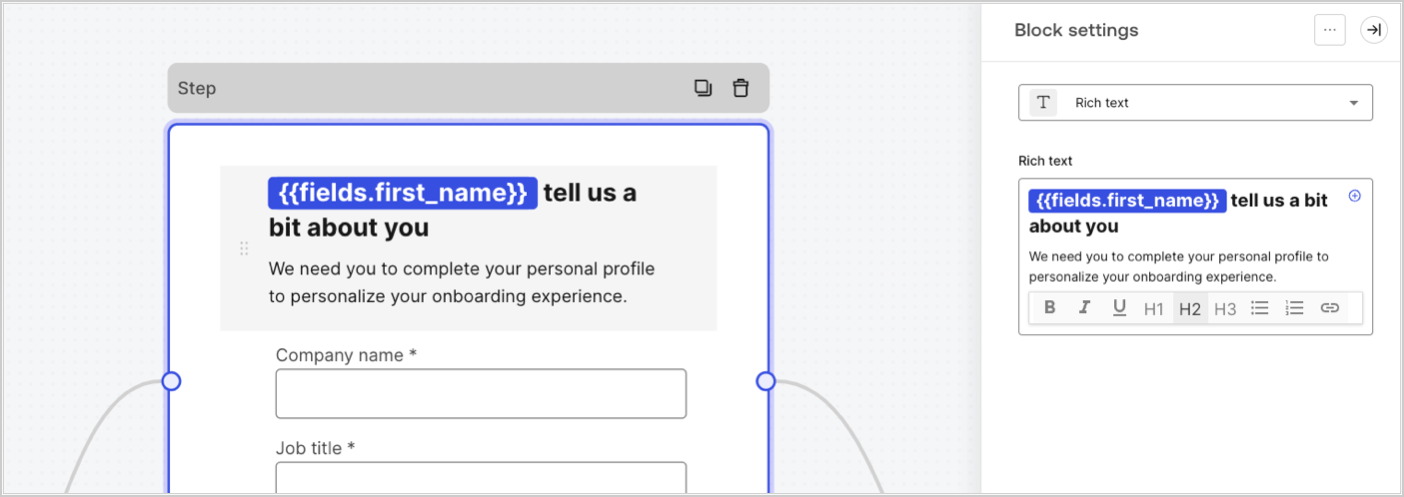
Les variables de champ contiennent les données saisies par l’utilisateur dans les champs de saisie du formulaire, ainsi que les données des champs masqués. Les données associées à chaque champ varient selon le type de champ. Par exemple : `{{fields.first_name}}` fait référence à la valeur saisie dans un champ ayant l’ID `first_name`.
<Frame>
  <img src="https://mintcdn.com/docs-dev-chore-myaccount-api-autoupdate/KVEFSMnw3xeg_LEn/docs/images/cdy7uua7fh8z/4D42A6ww4XvFxweoxh04Rd/016c2ed9d25bc2267ed3ed31bf8b2bf6/form-fields-variable.png?fit=max&auto=format&n=KVEFSMnw3xeg_LEn&q=85&s=5d2150edb3c962e22be83eb36a0d1559" alt="Dashboard > Actions > Forms > Form" data-og-width="1404" width="1404" data-og-height="497" height="497" data-path="docs/images/cdy7uua7fh8z/4D42A6ww4XvFxweoxh04Rd/016c2ed9d25bc2267ed3ed31bf8b2bf6/form-fields-variable.png" data-optimize="true" data-opv="3" srcset="https://mintcdn.com/docs-dev-chore-myaccount-api-autoupdate/KVEFSMnw3xeg_LEn/docs/images/cdy7uua7fh8z/4D42A6ww4XvFxweoxh04Rd/016c2ed9d25bc2267ed3ed31bf8b2bf6/form-fields-variable.png?w=280&fit=max&auto=format&n=KVEFSMnw3xeg_LEn&q=85&s=6cba4ceac85491a7352d99b37de70763 280w, https://mintcdn.com/docs-dev-chore-myaccount-api-autoupdate/KVEFSMnw3xeg_LEn/docs/images/cdy7uua7fh8z/4D42A6ww4XvFxweoxh04Rd/016c2ed9d25bc2267ed3ed31bf8b2bf6/form-fields-variable.png?w=560&fit=max&auto=format&n=KVEFSMnw3xeg_LEn&q=85&s=421a84dc7f618610b74bfe92598cd693 560w, https://mintcdn.com/docs-dev-chore-myaccount-api-autoupdate/KVEFSMnw3xeg_LEn/docs/images/cdy7uua7fh8z/4D42A6ww4XvFxweoxh04Rd/016c2ed9d25bc2267ed3ed31bf8b2bf6/form-fields-variable.png?w=840&fit=max&auto=format&n=KVEFSMnw3xeg_LEn&q=85&s=ad5f9bf9c2f57b8f1515a10bacad767a 840w, https://mintcdn.com/docs-dev-chore-myaccount-api-autoupdate/KVEFSMnw3xeg_LEn/docs/images/cdy7uua7fh8z/4D42A6ww4XvFxweoxh04Rd/016c2ed9d25bc2267ed3ed31bf8b2bf6/form-fields-variable.png?w=1100&fit=max&auto=format&n=KVEFSMnw3xeg_LEn&q=85&s=ccf5bebec6d99ffc1a1767142f59207c 1100w, https://mintcdn.com/docs-dev-chore-myaccount-api-autoupdate/KVEFSMnw3xeg_LEn/docs/images/cdy7uua7fh8z/4D42A6ww4XvFxweoxh04Rd/016c2ed9d25bc2267ed3ed31bf8b2bf6/form-fields-variable.png?w=1650&fit=max&auto=format&n=KVEFSMnw3xeg_LEn&q=85&s=0b19ceacd63db20fbaaf69fad599ec72 1650w, https://mintcdn.com/docs-dev-chore-myaccount-api-autoupdate/KVEFSMnw3xeg_LEn/docs/images/cdy7uua7fh8z/4D42A6ww4XvFxweoxh04Rd/016c2ed9d25bc2267ed3ed31bf8b2bf6/form-fields-variable.png?w=2500&fit=max&auto=format&n=KVEFSMnw3xeg_LEn&q=85&s=35a763fcbf0e06c1468caabc913a24ae 2500w" />
</Frame>

<h3 id="flow-output-actions-variables">
  Variables de sortie des actions de Flow
</h3>

Lorsqu’une action de Flow est exécutée, elle génère une réponse sous forme d’objet de sortie qui peut être utilisée dans les actions suivantes. Par exemple : `{{actions.generate_otp.code}}` fait référence au code de sortie de l’action ayant l’ID `generate_otp`.

<Frame>
  <img src="https://mintcdn.com/docs-dev-chore-myaccount-api-autoupdate/TwrLWOmtEE_zyIZg/docs/images/cdy7uua7fh8z/6jYtEdYqSGXm3DDv0mxQ0o/2d48012629745e07137bf6ba42f4d829/flow-output-variable.png?fit=max&auto=format&n=TwrLWOmtEE_zyIZg&q=85&s=7de1a00d94793ffd82f4ad3e9b5d3421" alt="Dashboard > Actions > Forms > Flows" data-og-width="1404" width="1404" data-og-height="253" height="253" data-path="docs/images/cdy7uua7fh8z/6jYtEdYqSGXm3DDv0mxQ0o/2d48012629745e07137bf6ba42f4d829/flow-output-variable.png" data-optimize="true" data-opv="3" srcset="https://mintcdn.com/docs-dev-chore-myaccount-api-autoupdate/TwrLWOmtEE_zyIZg/docs/images/cdy7uua7fh8z/6jYtEdYqSGXm3DDv0mxQ0o/2d48012629745e07137bf6ba42f4d829/flow-output-variable.png?w=280&fit=max&auto=format&n=TwrLWOmtEE_zyIZg&q=85&s=80b188704ae053e204c81ecf526d0c38 280w, https://mintcdn.com/docs-dev-chore-myaccount-api-autoupdate/TwrLWOmtEE_zyIZg/docs/images/cdy7uua7fh8z/6jYtEdYqSGXm3DDv0mxQ0o/2d48012629745e07137bf6ba42f4d829/flow-output-variable.png?w=560&fit=max&auto=format&n=TwrLWOmtEE_zyIZg&q=85&s=c52fdfcbcf1fd58396569706219523bb 560w, https://mintcdn.com/docs-dev-chore-myaccount-api-autoupdate/TwrLWOmtEE_zyIZg/docs/images/cdy7uua7fh8z/6jYtEdYqSGXm3DDv0mxQ0o/2d48012629745e07137bf6ba42f4d829/flow-output-variable.png?w=840&fit=max&auto=format&n=TwrLWOmtEE_zyIZg&q=85&s=8e95a5e0beea720425c676c4bab6a1f0 840w, https://mintcdn.com/docs-dev-chore-myaccount-api-autoupdate/TwrLWOmtEE_zyIZg/docs/images/cdy7uua7fh8z/6jYtEdYqSGXm3DDv0mxQ0o/2d48012629745e07137bf6ba42f4d829/flow-output-variable.png?w=1100&fit=max&auto=format&n=TwrLWOmtEE_zyIZg&q=85&s=8f03d23d03cdb12f3eaada54cf1b0df5 1100w, https://mintcdn.com/docs-dev-chore-myaccount-api-autoupdate/TwrLWOmtEE_zyIZg/docs/images/cdy7uua7fh8z/6jYtEdYqSGXm3DDv0mxQ0o/2d48012629745e07137bf6ba42f4d829/flow-output-variable.png?w=1650&fit=max&auto=format&n=TwrLWOmtEE_zyIZg&q=85&s=2f43d1248a7b0118205ecb2100dc3574 1650w, https://mintcdn.com/docs-dev-chore-myaccount-api-autoupdate/TwrLWOmtEE_zyIZg/docs/images/cdy7uua7fh8z/6jYtEdYqSGXm3DDv0mxQ0o/2d48012629745e07137bf6ba42f4d829/flow-output-variable.png?w=2500&fit=max&auto=format&n=TwrLWOmtEE_zyIZg&q=85&s=fe514d4979fd975b3c33cad7ecda7cde 2500w" />
</Frame>

<h3 id="shared-variables">
  Variables partagées
</h3>

Vous pouvez stocker des variables afin qu’elles soient partagées avec des flows ultérieurs ou même avec des composants de formulaire dans la même transaction. Les variables partagées sont éphémères et associées à un parcours de formulaire précis. Leurs valeurs ne sont pas accessibles à l’extérieur de ce parcours. Par exemple : `{{vars.external_id}}` fait référence à la valeur d’une variable partagée ayant l’ID `external_id`.

<Frame>
  <img src="https://mintcdn.com/docs-dev-chore-myaccount-api-autoupdate/KVEFSMnw3xeg_LEn/docs/images/cdy7uua7fh8z/4571ExRTHL0KZKJKX9pNwj/abb631b8608a6356b0e5b3784cf8b02f/flow-shared-variable.png?fit=max&auto=format&n=KVEFSMnw3xeg_LEn&q=85&s=2123d8779659aefed2b4b0dcf879c9cd" alt="Dashboard > Actions > Forms > Flows" data-og-width="1215" width="1215" data-og-height="162" height="162" data-path="docs/images/cdy7uua7fh8z/4571ExRTHL0KZKJKX9pNwj/abb631b8608a6356b0e5b3784cf8b02f/flow-shared-variable.png" data-optimize="true" data-opv="3" srcset="https://mintcdn.com/docs-dev-chore-myaccount-api-autoupdate/KVEFSMnw3xeg_LEn/docs/images/cdy7uua7fh8z/4571ExRTHL0KZKJKX9pNwj/abb631b8608a6356b0e5b3784cf8b02f/flow-shared-variable.png?w=280&fit=max&auto=format&n=KVEFSMnw3xeg_LEn&q=85&s=ca7666122de3ebbf00ec8708be7202ee 280w, https://mintcdn.com/docs-dev-chore-myaccount-api-autoupdate/KVEFSMnw3xeg_LEn/docs/images/cdy7uua7fh8z/4571ExRTHL0KZKJKX9pNwj/abb631b8608a6356b0e5b3784cf8b02f/flow-shared-variable.png?w=560&fit=max&auto=format&n=KVEFSMnw3xeg_LEn&q=85&s=e29436e0f9d70448793670c4a090d014 560w, https://mintcdn.com/docs-dev-chore-myaccount-api-autoupdate/KVEFSMnw3xeg_LEn/docs/images/cdy7uua7fh8z/4571ExRTHL0KZKJKX9pNwj/abb631b8608a6356b0e5b3784cf8b02f/flow-shared-variable.png?w=840&fit=max&auto=format&n=KVEFSMnw3xeg_LEn&q=85&s=b3397abf62a73caba643cfe0b8ce3f77 840w, https://mintcdn.com/docs-dev-chore-myaccount-api-autoupdate/KVEFSMnw3xeg_LEn/docs/images/cdy7uua7fh8z/4571ExRTHL0KZKJKX9pNwj/abb631b8608a6356b0e5b3784cf8b02f/flow-shared-variable.png?w=1100&fit=max&auto=format&n=KVEFSMnw3xeg_LEn&q=85&s=0897d620c307812b48879f0620b75278 1100w, https://mintcdn.com/docs-dev-chore-myaccount-api-autoupdate/KVEFSMnw3xeg_LEn/docs/images/cdy7uua7fh8z/4571ExRTHL0KZKJKX9pNwj/abb631b8608a6356b0e5b3784cf8b02f/flow-shared-variable.png?w=1650&fit=max&auto=format&n=KVEFSMnw3xeg_LEn&q=85&s=66c2ada5b3ada9a3bc387b0aa13b851e 1650w, https://mintcdn.com/docs-dev-chore-myaccount-api-autoupdate/KVEFSMnw3xeg_LEn/docs/images/cdy7uua7fh8z/4571ExRTHL0KZKJKX9pNwj/abb631b8608a6356b0e5b3784cf8b02f/flow-shared-variable.png?w=2500&fit=max&auto=format&n=KVEFSMnw3xeg_LEn&q=85&s=d487c6834340b042c7dd93c7e76acf5f 2500w" />
</Frame>

<Warning>
  Variables partagées :

  * sont internes (côté serveur) et ne sont pas exposées au navigateur (côté client).
  * peuvent être résolues et exposées au navigateur si vous faites référence à une variable partagée dans un composant de formulaire.
  * peuvent contenir des renseignements sensibles; faites donc preuve de prudence lorsque vous accédez à une variable partagée afin d’éviter toute exposition inutile ou involontaire.
</Warning>

<h3 id="helper-functions">
  Fonctions utilitaires
</h3>

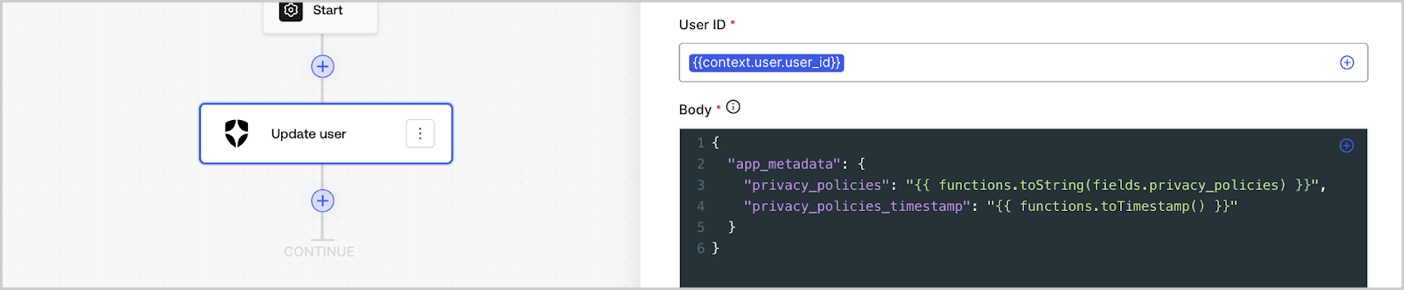
Les fonctions utilitaires vous permettent de transformer des données et d’effectuer des opérations simples. Par exemple : `{{functions.toString(fields.privacy_policies)}}` transforme la valeur du champ dont l’ID est `privacy_policies` à l’aide de la fonction `toString()`.
<Frame>
  <img src="https://mintcdn.com/docs-dev-chore-myaccount-api-autoupdate/8QDqDsYoCi_WTBFO/docs/images/cdy7uua7fh8z/1gyox33XJEtdkT43NppblT/0e878cc5ae2bde11b4207e105bbac6c5/flow-helper-functions.png?fit=max&auto=format&n=8QDqDsYoCi_WTBFO&q=85&s=d5cf5239a1dd2549828fb6b5f0147297" alt="Dashboard > Actions > Forms > Flows" data-og-width="1404" width="1404" data-og-height="290" height="290" data-path="docs/images/cdy7uua7fh8z/1gyox33XJEtdkT43NppblT/0e878cc5ae2bde11b4207e105bbac6c5/flow-helper-functions.png" data-optimize="true" data-opv="3" srcset="https://mintcdn.com/docs-dev-chore-myaccount-api-autoupdate/8QDqDsYoCi_WTBFO/docs/images/cdy7uua7fh8z/1gyox33XJEtdkT43NppblT/0e878cc5ae2bde11b4207e105bbac6c5/flow-helper-functions.png?w=280&fit=max&auto=format&n=8QDqDsYoCi_WTBFO&q=85&s=731a0cb29c531e49c7aa7900c15be394 280w, https://mintcdn.com/docs-dev-chore-myaccount-api-autoupdate/8QDqDsYoCi_WTBFO/docs/images/cdy7uua7fh8z/1gyox33XJEtdkT43NppblT/0e878cc5ae2bde11b4207e105bbac6c5/flow-helper-functions.png?w=560&fit=max&auto=format&n=8QDqDsYoCi_WTBFO&q=85&s=8dd2f197c511baebf99f73d610f4d4dc 560w, https://mintcdn.com/docs-dev-chore-myaccount-api-autoupdate/8QDqDsYoCi_WTBFO/docs/images/cdy7uua7fh8z/1gyox33XJEtdkT43NppblT/0e878cc5ae2bde11b4207e105bbac6c5/flow-helper-functions.png?w=840&fit=max&auto=format&n=8QDqDsYoCi_WTBFO&q=85&s=586538f24f97042211719df404515d48 840w, https://mintcdn.com/docs-dev-chore-myaccount-api-autoupdate/8QDqDsYoCi_WTBFO/docs/images/cdy7uua7fh8z/1gyox33XJEtdkT43NppblT/0e878cc5ae2bde11b4207e105bbac6c5/flow-helper-functions.png?w=1100&fit=max&auto=format&n=8QDqDsYoCi_WTBFO&q=85&s=63536240574e3a661e6c47e4740022dd 1100w, https://mintcdn.com/docs-dev-chore-myaccount-api-autoupdate/8QDqDsYoCi_WTBFO/docs/images/cdy7uua7fh8z/1gyox33XJEtdkT43NppblT/0e878cc5ae2bde11b4207e105bbac6c5/flow-helper-functions.png?w=1650&fit=max&auto=format&n=8QDqDsYoCi_WTBFO&q=85&s=c00b016ec845f06c0227430ad4c447c1 1650w, https://mintcdn.com/docs-dev-chore-myaccount-api-autoupdate/8QDqDsYoCi_WTBFO/docs/images/cdy7uua7fh8z/1gyox33XJEtdkT43NppblT/0e878cc5ae2bde11b4207e105bbac6c5/flow-helper-functions.png?w=2500&fit=max&auto=format&n=8QDqDsYoCi_WTBFO&q=85&s=4b8781eed161eb66fda691ebfdda1667 2500w" />
</Frame>

Les fonctions utilitaires disponibles sont :

| Fonction                                 | Description                                                                                                                                                                                                                                                                                                           | Exemple                                                                                                          |
| ---------------------------------------- | --------------------------------------------------------------------------------------------------------------------------------------------------------------------------------------------------------------------------------------------------------------------------------------------------------------------- | ---------------------------------------------------------------------------------------------------------------- |
| `toArray(value)`                         | Convertit la valeur en tableau.                                                                                                                                                                                                                                                                                       | `{{ functions.toArray('abc') }} // ['abc']`                                                                      |
| `toBoolean(value)`                       | Convertit la valeur en valeur booléenne.                                                                                                                                                                                                                                                                              | `{{ functions.toBoolean(1) }} // vrai&lt;br /&gt;&lt;br /&gt;\{\{ functions.toBoolean(0) }} // faux`             |
| `length(value)`                          | Retourne la longueur de la valeur du paramètre.                                                                                                                                                                                                                                                                       | `{{ functions.length('auth0') }} // 5`                                                                           |
| `mask(value)`                            | Masque une valeur afin d’éviter qu’elle ne soit affichée dans Executions.                                                                                                                                                                                                                                             | `{{ functions.mask('my_awesome_secret') }} // ███`                                                               |
| `toNumber(value)`                        | Convertit la valeur en nombre.                                                                                                                                                                                                                                                                                        | `{{ functions.toNumber('123') }} // 123`                                                                         |
| `random(min, max, [boolean])`            | Renvoie un nombre aléatoire compris entre les valeurs min et max, inclusivement.                                                                                                                                                                                                                                      | `{{ functions.random(0, 6) }} // 4 &lt;br /&gt;&lt;br /&gt;\{\{ functions.random(0, 6, true) }} // 3.8523497...` |
| `slice(value, start, end)`               | Renvoie une portion d’un tableau ou d’une chaîne de caractères comprise entre les indices de début et de fin.                                                                                                                                                                                                         | `{{ functions.slice( 'example', 3, 5) }} // 'mp'`                                                                |
| `toString(value)`                        | Convertit la valeur en chaîne de caractères.                                                                                                                                                                                                                                                                          | `{{ functions.toString(123) }} // '123'`                                                                         |
| `substring(value, start, end)`           | Retourne la partie d’une valeur comprise entre l’index de début et l’index de fin. Pour en savoir plus, consultez les [différences entre les fonctions slice et substring](https://developer.mozilla.org/en-US/docs/Web/JavaScript/Reference/Global_Objects/String/substring#differences_between_substring_and_slice) | `{{ functions.substring( 'example’', 3, 5) }} // 'mp'`                                                           |
| `toTimestamp()`                          | Renvoie l’horodatage UNIX actuel.                                                                                                                                                                                                                                                                                     | `{{ functions.toTimestamp() }} // 1628761483`                                                                    |
| `toTimestamp(date)`                      | Retourne la date fournie au format UNIX.                                                                                                                                                                                                                                                                              | `{{ functions.toTimestamp('2021-04-30T10:02:50.876Z') }} // 1619776970`                                          |
| `toTimestamp(date)`                      | Retourne la date fournie au format UNIX.                                                                                                                                                                                                                                                                              | `{{ functions.toTimestamp('2021-04-30T10:02:50.876Z') }} // 1619776970`                                          |
| `toLowerCase(value)`                     | Retourne une nouvelle chaîne en minuscules.                                                                                                                                                                                                                                                                           | `{{ functions.toLowerCase('JohnDoe 1234') }} // johndoe 1234`                                                    |
| `toUpperCase(value)`                     | Retourne une nouvelle chaîne en majuscules.                                                                                                                                                                                                                                                                           | `{{ functions.toUpperCase('JohnDoe 1234') }} // JOHNDOE 1234`                                                    |
| `replaceAll(value, string, replacement)` | Renvoie une nouvelle chaîne dans laquelle toutes les occurrences d’un motif sont remplacées par une chaîne de remplacement.                                                                                                                                                                                           | `{{ functions.replaceAll('2021-04-30', '-', '/') }} // 2021/04/30`                                               |
| `replace(value, string, replacement)`    | Renvoie une nouvelle chaîne dans laquelle toutes les occurrences d’un motif sont remplacées par une chaîne de remplacement. Si le motif est une chaîne, seule la première occurrence sera remplacée.                                                                                                                  | `{{ functions.replace('2021-04-30', '-', '/') }} // 2021/04-30`                                                  |
| `split(value, separator, limit?)`        | Renvoie une liste ordonnée de sous-chaînes découpées selon le séparateur.                                                                                                                                                                                                                                             | `{{ functions.split('2021-04-30', '-') }} // ['2021', '04', '30']`                                               |
| `now()`                                  | Renvoie la date actuelle au format ISO 8601.                                                                                                                                                                                                                                                                          | `{{ functions.now() }} // 2021-04-30T10:31:28.576Z`                                                              |
| `includes(collection, item, fromIndex?)` | Indique si un tableau contient une certaine valeur parmi ses éléments.                                                                                                                                                                                                                                                | `{{ functions.includes(['auth0', 'identity', 'authentication'], 'identity') }} // true`                          |
| `indexOf(collection, item, fromIndex?)`  | Renvoie le premier indice auquel un élément donné peut être trouvé dans le tableau, ou -1 s’il n’y figure pas.                                                                                                                                                                                                        | `{{ functions.indexOf(['auth0', 'identity', 'authentication'], 'identity') }} // 1`                              |
| `merge(base, value)`                     | Renvoie un tableau ou un objet fusionné, ou concatène une chaîne selon le type de données de base.                                                                                                                                                                                                                    | `{{ functions.merge(['auth0', 'identity'], ['authentication']) }} // ['auth0', 'identity', 'authentication']`    |
| `md5(value)`                             | Renvoie une valeur hachée avec MD5.                                                                                                                                                                                                                                                                                   | `{{ functions.md5('auth0') }} // 7bbb597...`                                                                     |
| `sha1(value)`                            | Renvoie une valeur hachée avec SHA1.                                                                                                                                                                                                                                                                                  | `{{ functions.sha1('auth0') }} // b4ec5339...`                                                                   |
| `sha256(value)`                          | Renvoie une valeur hachée avec SHA256.                                                                                                                                                                                                                                                                                | `{{ functions.sha256('auth0') }} // d9082bdc...`                                                                 |
| `sha512(value)`                          | Renvoie une valeur hachée avec SHA512.                                                                                                                                                                                                                                                                                | `{{ functions.sha512('auth0') }} // c0d588069d...`                                                               |
| `uuid()`                                 | Renvoie un UUID v4 aléatoire.                                                                                                                                                                                                                                                                                         | `{{ functions.uuid() }} // 36b8f84d-df4e-4d49-b662-bcde71a8764`                                                  |

<h2 id="variables-best-practices">
  Bonnes pratiques pour les variables
</h2>

<h3 id="use-meaningful-ids">
  Utilisez des IDs parlants
</h3>

Lorsque vous ajoutez un champ de Form ou une action de Flow, l’ID est généré automatiquement.

Modifiez l’ID pour lui donner une valeur plus descriptive afin de pouvoir identifier l’information qu’il contient. Par exemple, si vous créez un champ de Form qui stocke le prénom de l’utilisateur, remplacez l’ID par `first_name`.

<h3 id="be-mindful-when-updating-existing-ids">
  Faites preuve de prudence lorsque vous mettez à jour des IDs existants
</h3>

Si une variable est déjà utilisée et que vous devez modifier l’ID, repérez les endroits où vous y avez fait référence et mettez l’ID à jour en conséquence afin d’éviter les valeurs non définies ou vides.

<h3 id="check-flow-executions">
  Vérifier les exécutions du Flow
</h3>

Si vous voyez une valeur de variable inattendue, utilisez la vue [**Executions**](/docs/fr-ca/customize/forms/flows/flow-execution-and-debugger) pour diagnostiquer le problème lié à la variable.

<h3 id="use-the-autocomplete-menu">
  Utilisez le menu de saisie semi-automatique
</h3>

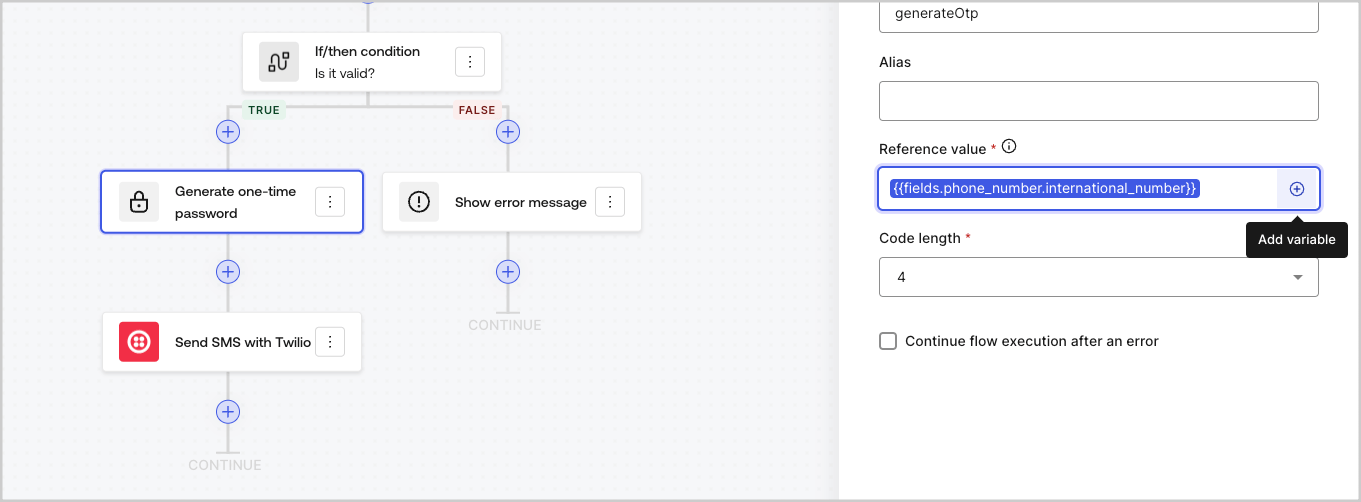
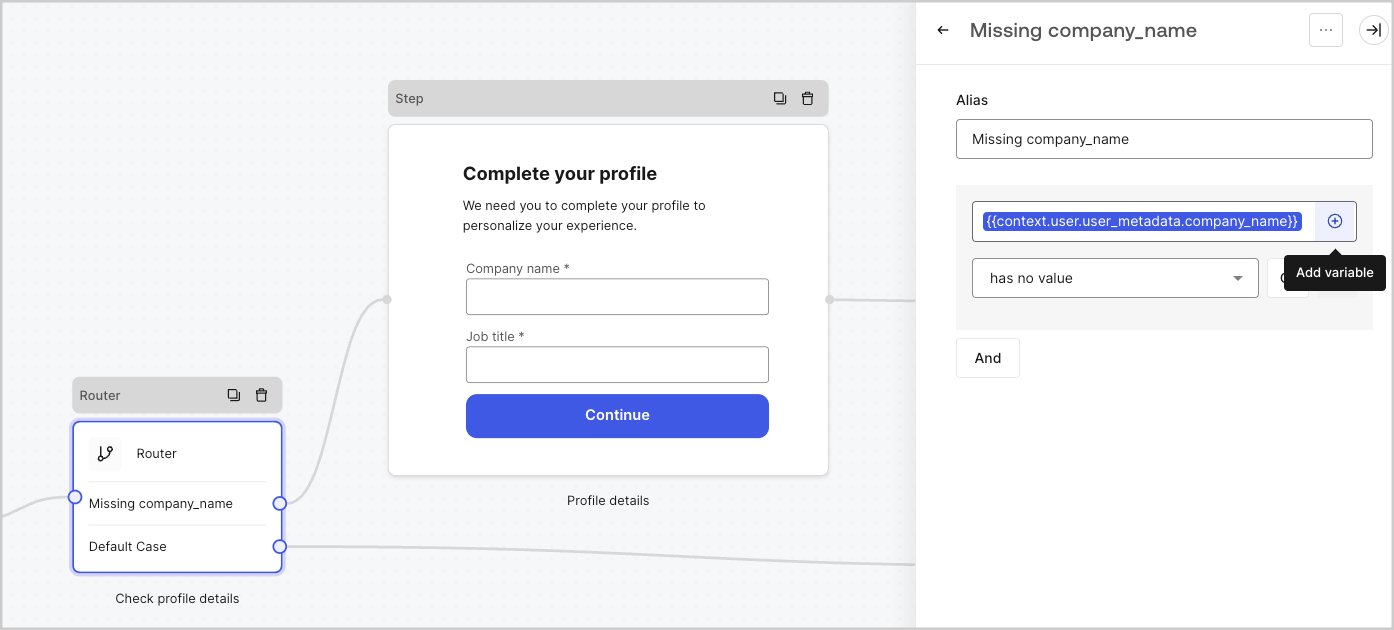
Le menu de saisie semi-automatique vous aide à trouver et à référencer correctement les variables existantes.
<Frame>
  <img src="https://mintcdn.com/docs-dev-chore-myaccount-api-autoupdate/xjbLFTbb3mNkqhP2/docs/images/cdy7uua7fh8z/3SKnDuaMzSImxZtDDAoZaz/9ea800fad29ef71d1ded3c72b87660a4/Autocomplete-flows.png?fit=max&auto=format&n=xjbLFTbb3mNkqhP2&q=85&s=7f20d89bc625dda4ac5e09b3420a5769" alt="Dashboard > Actions > Forms > Flows" data-og-width="1361" width="1361" data-og-height="502" height="502" data-path="docs/images/cdy7uua7fh8z/3SKnDuaMzSImxZtDDAoZaz/9ea800fad29ef71d1ded3c72b87660a4/Autocomplete-flows.png" data-optimize="true" data-opv="3" srcset="https://mintcdn.com/docs-dev-chore-myaccount-api-autoupdate/xjbLFTbb3mNkqhP2/docs/images/cdy7uua7fh8z/3SKnDuaMzSImxZtDDAoZaz/9ea800fad29ef71d1ded3c72b87660a4/Autocomplete-flows.png?w=280&fit=max&auto=format&n=xjbLFTbb3mNkqhP2&q=85&s=248bcc11393f8b74c5d1eccb51446dbd 280w, https://mintcdn.com/docs-dev-chore-myaccount-api-autoupdate/xjbLFTbb3mNkqhP2/docs/images/cdy7uua7fh8z/3SKnDuaMzSImxZtDDAoZaz/9ea800fad29ef71d1ded3c72b87660a4/Autocomplete-flows.png?w=560&fit=max&auto=format&n=xjbLFTbb3mNkqhP2&q=85&s=68c9c8de73d558dd8dc48fa79cc4d2d5 560w, https://mintcdn.com/docs-dev-chore-myaccount-api-autoupdate/xjbLFTbb3mNkqhP2/docs/images/cdy7uua7fh8z/3SKnDuaMzSImxZtDDAoZaz/9ea800fad29ef71d1ded3c72b87660a4/Autocomplete-flows.png?w=840&fit=max&auto=format&n=xjbLFTbb3mNkqhP2&q=85&s=6a820e86ddc8f9014fe03d2e1115aa54 840w, https://mintcdn.com/docs-dev-chore-myaccount-api-autoupdate/xjbLFTbb3mNkqhP2/docs/images/cdy7uua7fh8z/3SKnDuaMzSImxZtDDAoZaz/9ea800fad29ef71d1ded3c72b87660a4/Autocomplete-flows.png?w=1100&fit=max&auto=format&n=xjbLFTbb3mNkqhP2&q=85&s=4d113f2643732725b12ad1dc6eecd4cd 1100w, https://mintcdn.com/docs-dev-chore-myaccount-api-autoupdate/xjbLFTbb3mNkqhP2/docs/images/cdy7uua7fh8z/3SKnDuaMzSImxZtDDAoZaz/9ea800fad29ef71d1ded3c72b87660a4/Autocomplete-flows.png?w=1650&fit=max&auto=format&n=xjbLFTbb3mNkqhP2&q=85&s=1357837a1299240c7d2571574b443777 1650w, https://mintcdn.com/docs-dev-chore-myaccount-api-autoupdate/xjbLFTbb3mNkqhP2/docs/images/cdy7uua7fh8z/3SKnDuaMzSImxZtDDAoZaz/9ea800fad29ef71d1ded3c72b87660a4/Autocomplete-flows.png?w=2500&fit=max&auto=format&n=xjbLFTbb3mNkqhP2&q=85&s=6c0b22eefe7927333dc664dfee0ba61d 2500w" />
</Frame>

<Frame>
  <img src="https://mintcdn.com/docs-dev-chore-myaccount-api-autoupdate/xjbLFTbb3mNkqhP2/docs/images/cdy7uua7fh8z/2kjRKozVgrd2a7UJXOANaN/ee5452d7210cd2f13b0e97763f11c82a/Autocomplete-forms.png?fit=max&auto=format&n=xjbLFTbb3mNkqhP2&q=85&s=8936e724dc59815b31b16a86032e169c" alt="Dashboard > Actions > Forms > Form" data-og-width="1394" width="1394" data-og-height="630" height="630" data-path="docs/images/cdy7uua7fh8z/2kjRKozVgrd2a7UJXOANaN/ee5452d7210cd2f13b0e97763f11c82a/Autocomplete-forms.png" data-optimize="true" data-opv="3" srcset="https://mintcdn.com/docs-dev-chore-myaccount-api-autoupdate/xjbLFTbb3mNkqhP2/docs/images/cdy7uua7fh8z/2kjRKozVgrd2a7UJXOANaN/ee5452d7210cd2f13b0e97763f11c82a/Autocomplete-forms.png?w=280&fit=max&auto=format&n=xjbLFTbb3mNkqhP2&q=85&s=509e453977ef98e6a641fbba7b9187f6 280w, https://mintcdn.com/docs-dev-chore-myaccount-api-autoupdate/xjbLFTbb3mNkqhP2/docs/images/cdy7uua7fh8z/2kjRKozVgrd2a7UJXOANaN/ee5452d7210cd2f13b0e97763f11c82a/Autocomplete-forms.png?w=560&fit=max&auto=format&n=xjbLFTbb3mNkqhP2&q=85&s=195f996c0d50b8c21fa5e804ed91495d 560w, https://mintcdn.com/docs-dev-chore-myaccount-api-autoupdate/xjbLFTbb3mNkqhP2/docs/images/cdy7uua7fh8z/2kjRKozVgrd2a7UJXOANaN/ee5452d7210cd2f13b0e97763f11c82a/Autocomplete-forms.png?w=840&fit=max&auto=format&n=xjbLFTbb3mNkqhP2&q=85&s=3c734354434f25cfb4f0c0860f1da8e8 840w, https://mintcdn.com/docs-dev-chore-myaccount-api-autoupdate/xjbLFTbb3mNkqhP2/docs/images/cdy7uua7fh8z/2kjRKozVgrd2a7UJXOANaN/ee5452d7210cd2f13b0e97763f11c82a/Autocomplete-forms.png?w=1100&fit=max&auto=format&n=xjbLFTbb3mNkqhP2&q=85&s=5a7d6605632c0fceb1c9088da2aa9a3e 1100w, https://mintcdn.com/docs-dev-chore-myaccount-api-autoupdate/xjbLFTbb3mNkqhP2/docs/images/cdy7uua7fh8z/2kjRKozVgrd2a7UJXOANaN/ee5452d7210cd2f13b0e97763f11c82a/Autocomplete-forms.png?w=1650&fit=max&auto=format&n=xjbLFTbb3mNkqhP2&q=85&s=ae236063086168e75c3570451416568c 1650w, https://mintcdn.com/docs-dev-chore-myaccount-api-autoupdate/xjbLFTbb3mNkqhP2/docs/images/cdy7uua7fh8z/2kjRKozVgrd2a7UJXOANaN/ee5452d7210cd2f13b0e97763f11c82a/Autocomplete-forms.png?w=2500&fit=max&auto=format&n=xjbLFTbb3mNkqhP2&q=85&s=cd6f8e83efadde90cd74050bbd54bcbc 2500w" />
</Frame>
