> ## Documentation Index
> Fetch the complete documentation index at: https://docs-dev-chore-myaccount-api-autoupdate.mintlify.site/llms.txt
> Use this file to discover all available pages before exploring further.
> Activez et configurez les Customer Managed Keys (BYOK) pour votre tenant Auth0 à l’aide du Auth0 Dashboard.
# Configurer les Customer Managed Keys avec le Dashboard
Auth0 protège les secrets et les données de votre tenant à l’aide d’une Auth0 Environment Root Key, au sommet de la hiérarchie de clés du chiffrement par enveloppe. L’Auth0 Environment Root Key et la Customer Provided Root Key sont stockées dans le module matériel de sécurité (HSM) du fournisseur de services infonuagiques Auth0 correspondant, AWS ou Azure.
Bring Your Own Key
Avec Bring Your Own Key, les utilisateurs ayant le [Key Management Editor role](/docs/fr-ca/get-started/manage-dashboard-access/add-dashboard-users) peuvent utiliser le Auth0 Dashboard pour remplacer l’Auth0 Environment Root Key par défaut par leur propre Customer Provided Root Key.
Les clients peuvent téléverser de façon sécuritaire leur propre Root Key, qui contient leur propre matériel cryptographique, afin de :
* Répondre à des exigences personnalisées de génération et de provenance de clé pour l’Environment Root Key.
* Répondre à des exigences précises d’installation ou de durée de vie de clé pour l’Environment Root Key.
En important votre propre Customer Provided Root Key avec Bring Your Own Key, vous retirez implicitement à Auth0 la gestion du cycle de vie de la Customer Provided Root Key, sauf en ce qui concerne sa suppression.
Pour commencer, accédez à Dashboard > Settings > Encryption Keys
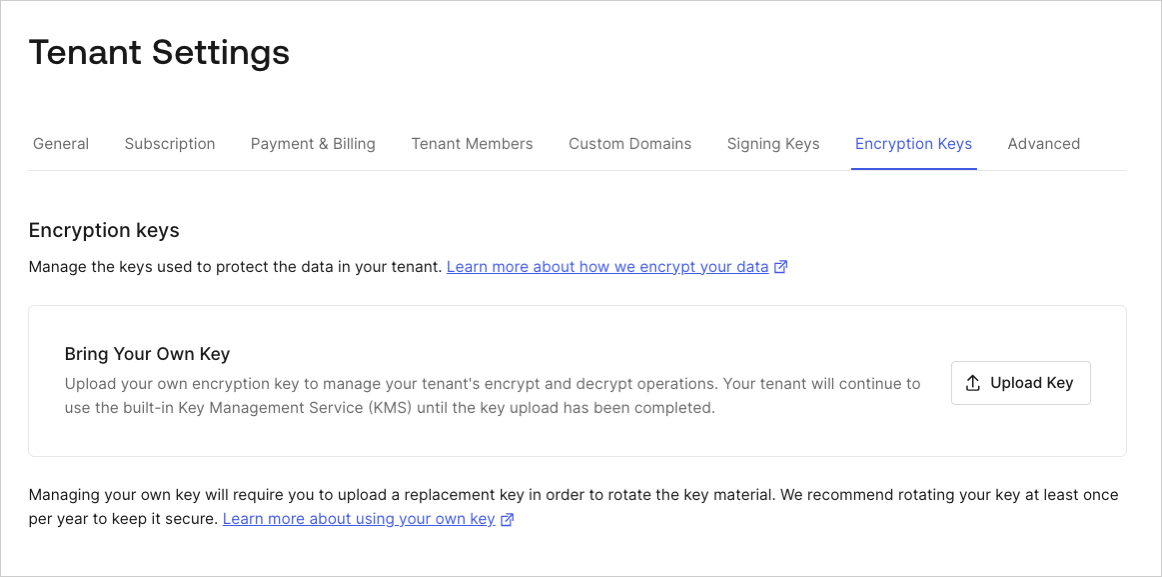 Sélectionnez **Upload Key** pour lancer le processus d’importation de votre Customer Provided Root Key. Cela ouvrira la boîte de dialogue d’importation :
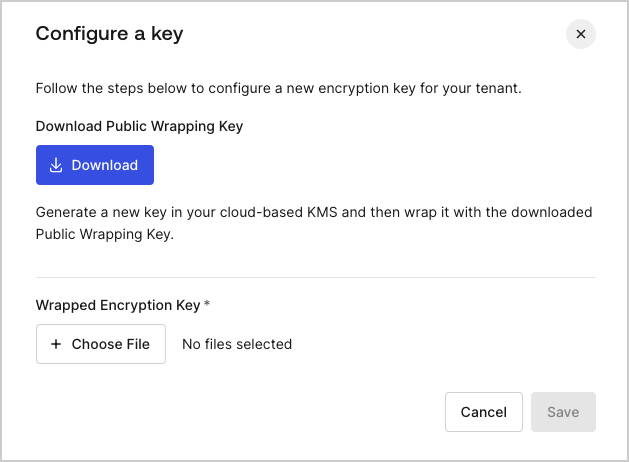 Lorsque vous sélectionnez **Upload Key**, puis **Download**, le processus Bring Your Own Key est lancé :
1. Une clé d’enveloppement publique est créée et téléchargée sur votre système.
2. Prenez la clé d’enveloppement publique et utilisez-la pour envelopper votre propre matériel cryptographique à l’aide de votre propre système de gestion des clés afin de créer une clé de chiffrement enveloppée (la Customer Provided Root Key).
3. Téléversez votre clé de chiffrement enveloppée et sélectionnez **Save**.
Une fois téléversée, la clé de chiffrement enveloppée remplace l’Auth0 Environment Root Key dans le module matériel de sécurité (AWS ou Azure) en tant que Customer Provided Root Key.
Lorsque vous sélectionnez **Upload Key**, puis **Download**, le processus Bring Your Own Key est lancé :
1. Une clé d’enveloppement publique est créée et téléchargée sur votre système.
2. Prenez la clé d’enveloppement publique et utilisez-la pour envelopper votre propre matériel cryptographique à l’aide de votre propre système de gestion des clés afin de créer une clé de chiffrement enveloppée (la Customer Provided Root Key).
3. Téléversez votre clé de chiffrement enveloppée et sélectionnez **Save**.
Une fois téléversée, la clé de chiffrement enveloppée remplace l’Auth0 Environment Root Key dans le module matériel de sécurité (AWS ou Azure) en tant que Customer Provided Root Key.
Exigences relatives au matériel cryptographique
Utilisez votre système de gestion de clés pour envelopper votre propre matériel cryptographique à l’aide de la clé d’enveloppement publique et créer la clé de chiffrement enveloppée. Utilisez les paramètres suivants pour l’algorithme [CKM\_RSA\_AES\_KEY\_WRAP](https://docs.oasis-open.org/pkcs11/pkcs11-curr/v2.40/cos01/pkcs11-curr-v2.40-cos01.html#_Toc408226894), selon votre fournisseur de services infonuagiques Auth0 (AWS ou Azure) :
Auth0 on AWS cloud
* Longueur de la clé d’enveloppement publique : 3072 bits
* Algorithme : CKG\_MGF1\_SHA256
* Longueur de la clé AES temporaire pour CKM\_AES\_KEY\_WRAP\_PAD : 256 bits
* Type de la clé racine fournie par le client : clé symétrique AES de 256 bits
Auth0 on Azure
* Longueur de la clé d’enveloppement publique : 2048 bits
* Algorithme : CKG\_MGF1\_SHA-1
* Longueur de la clé AES temporaire pour CKM\_AES\_KEY\_WRAP\_PAD : 256 bits
* Type de Customer Provided Root Key : clé privée RSA de 2048 bits
* Encodage de la clé privée : PKCS #8 - ASN.1 DER