> ## Documentation Index
> Fetch the complete documentation index at: https://docs-dev-chore-myaccount-api-autoupdate.mintlify.site/llms.txt
> Use this file to discover all available pages before exploring further.
> Use the Auth0 MCP Server to manage your Auth0 tenant through natural language with AI tools, like Claude Desktop, using secure OAuth 2.0 Device Authorization.
# Auth0 Model Context Protocol (MCP) Server
export const ReleaseStageNotice = ({feature, stage, plans, contact, terms}) => {
const stageTextMap = {
"beta": "Beta",
"ea": "Early Access"
};
const stageText = stageTextMap[stage] || "a product release stage";
const prsLink = "/docs/troubleshoot/product-lifecycle/product-release-stages";
const linkify = (text, url) => {
return {text};
};
const includeDetails = (plans, contact, terms) => {
const hasDetails = terms || plans || contact;
if (!hasDetails) return null;
return
{plans && <>This feature is available for {linkify(`${plans} plans`, "https://auth0.com/pricing")}. }
{contact && "To participate, contact " + contact + ". "}
{terms && <>By using this feature, you agree to the applicable Free Trial terms in Okta's {linkify("Master Subscription Agreement", "https://www.okta.com/legal")}.}
;
};
return
The {feature} feature is in {linkify(stageText, prsLink)}.
{includeDetails(plans, contact, terms)}
;
};
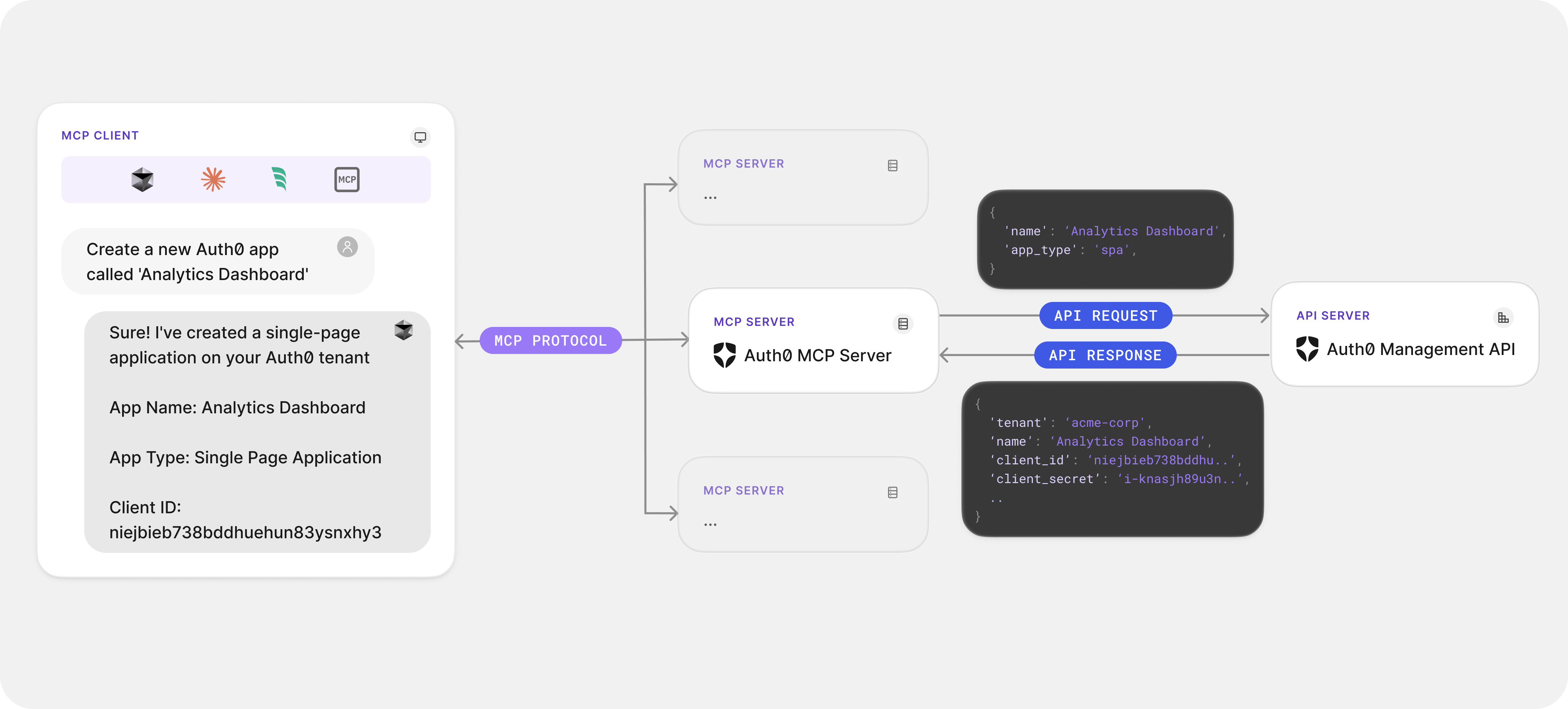
The Auth0 Model Context Protocol (MCP) Server connects AI agents to your Auth0 tenant, allowing them to perform complex, multi-step operations in Auth0 such as creating applications, managing users, or deploying Actions. It leverages the [Model Context Protocol (MCP)](https://modelcontextprotocol.io/introduction), a standardized protocol that enables AI agents to communicate with external tools and APIs to execute tasks on your behalf.
Designed for developers who use AI-powered tools like Cursor, Windsurf, or Claude Desktop, the Auth0 MCP Server transforms how developers manage their identity infrastructure, making it faster and easier to work with Auth0 services.
 ## Authentication and credential security
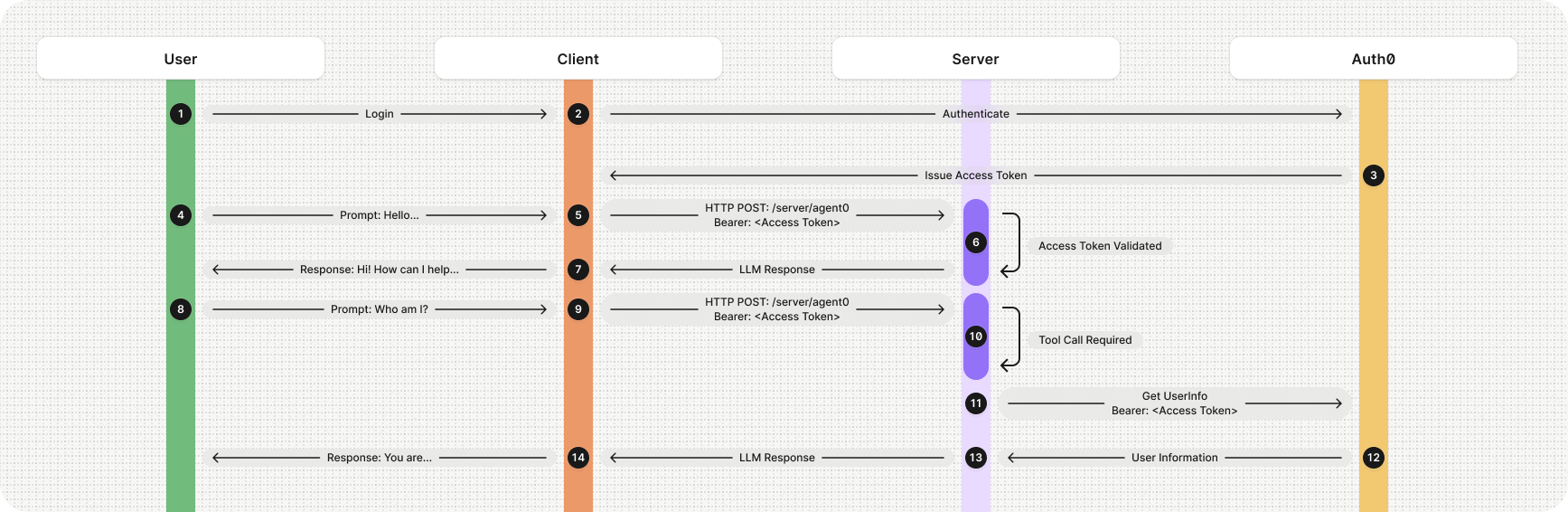
Auth0 MCP Server prioritizes robust security by managing authentication, validating requests, and ensuring secure communication with the Auth0 Management API. This includes:
* [OAuth 2.0 Device Authorization Flow](/docs/get-started/authentication-and-authorization-flow/device-authorization-flow): Securely authenticates requests with Auth0.
* [Secure credential storage](/docs/get-started/applications/rotate-credentials): Credentials are securely stored in your system's keychain and never exposed in plain text.
* [Minimal API permissions](/docs/secure/tokens/access-tokens/management-api-access-tokens): Only essential permissions are requested, adhering strictly to the principle of least privilege.
## Authentication and credential security
Auth0 MCP Server prioritizes robust security by managing authentication, validating requests, and ensuring secure communication with the Auth0 Management API. This includes:
* [OAuth 2.0 Device Authorization Flow](/docs/get-started/authentication-and-authorization-flow/device-authorization-flow): Securely authenticates requests with Auth0.
* [Secure credential storage](/docs/get-started/applications/rotate-credentials): Credentials are securely stored in your system's keychain and never exposed in plain text.
* [Minimal API permissions](/docs/secure/tokens/access-tokens/management-api-access-tokens): Only essential permissions are requested, adhering strictly to the principle of least privilege.
 ## Supported tools and integrations
Auth0 MCP Server currently integrates with the following [MCP clients](https://modelcontextprotocol.io/clients), including:
* [Claude Desktop](https://claude.ai/download)
* [Cursor](https://www.cursor.com/downloads)
* [Windsurf](https://www.windsurf.com/editor)
Additional integrations will be added as major new clients emerge. For a complete list of supported tools and detailed functionality, please refer to our [Auth0 Model Context Protocol (MCP) Server Tools Reference](/docs/get-started/auth0-mcp-server/auth0-mcp-tools-reference).
## Next Steps
Ready to get started? Visit our [Getting Started with Auth0 Model Context Protocol (MCP) Server guide](/docs/get-started/auth0-mcp-server/getting-started-with-auth0-mcp-server) to begin integrating Auth0 MCP Server into your workflow. For developers interested in deeper insights or contributing, check out [our repository on GitHub](https://github.com/auth0/auth0-mcp-server).
## Supported tools and integrations
Auth0 MCP Server currently integrates with the following [MCP clients](https://modelcontextprotocol.io/clients), including:
* [Claude Desktop](https://claude.ai/download)
* [Cursor](https://www.cursor.com/downloads)
* [Windsurf](https://www.windsurf.com/editor)
Additional integrations will be added as major new clients emerge. For a complete list of supported tools and detailed functionality, please refer to our [Auth0 Model Context Protocol (MCP) Server Tools Reference](/docs/get-started/auth0-mcp-server/auth0-mcp-tools-reference).
## Next Steps
Ready to get started? Visit our [Getting Started with Auth0 Model Context Protocol (MCP) Server guide](/docs/get-started/auth0-mcp-server/getting-started-with-auth0-mcp-server) to begin integrating Auth0 MCP Server into your workflow. For developers interested in deeper insights or contributing, check out [our repository on GitHub](https://github.com/auth0/auth0-mcp-server).